A lot of businesses treat a website as a one-off project with a clear finish line: launch day. After that, attention moves on to the next priority, and the site is largely left to run itself.
This is one of the more consistently expensive assumptions we see. An unmaintained site doesn't just stay static: it quietly degrades, becomes more vulnerable, and loses ground in search rankings. Often nobody notices until something breaks visibly, or a client mentions a problem that's clearly been present for months.
Here's a practical, honest breakdown of what proper website maintenance actually involves in 2026. Businesses that treat it as an ongoing discipline, rather than a one-off project, consistently avoid the expensive surprises that the ones who don't eventually run into.
Security risks increase over time, not just at launch. The software underlying your site, whether that's WordPress, a plugin ecosystem, or another content management system, receives regular security updates. These updates address vulnerabilities discovered after the software's original release.
A site running outdated software isn't just missing new features. It's running with known, publicly documented vulnerabilities, and automated scanning tools used by malicious actors specifically look for weaknesses like these.
The UK's National Cyber Security Centre publishes clear guidance for small businesses on exactly this kind of risk. Keeping software updated sits near the top of nearly every practical list they produce.
Broken elements accumulate silently. Links break as other sites restructure or shut down pages you'd linked to. Forms stop submitting properly after an update to a plugin or a change on a third-party service they connect to.
Images fail to load after a hosting migration nobody fully tested.
None of these tend to announce themselves loudly. A broken contact form doesn't send you an error message; it just quietly stops generating enquiries. The business often only finds out when a client mentions trying and failing to get in touch, and by then the problem could have been sitting there for months.
Search rankings can quietly erode. Google favours sites that are actively maintained, fast, secure, and free of broken elements over neglected ones. A site slowly accumulating broken links, security warnings, or slow load times as its software falls behind will typically see a gradual, hard-to-notice decline in rankings, rather than a single dramatic drop that would prompt someone to investigate.
By the time the decline is obvious in analytics, a meaningful amount of ground has usually already been lost.
The cost of neglect compounds. A small software update skipped for a few weeks is a trivial task.
The same update, if skipped for two years across dozens of interdependent plugins and a core platform that's fallen multiple major versions behind, can turn into a genuinely expensive, risky rebuild project rather than a routine update. The gap between current and required versions has simply grown too large to bridge safely and incrementally.
Regular software and plugin updates. Core platform updates, plugin and theme updates, and any underlying server software should stay current on an ongoing schedule. This shouldn't be an occasional catch-up when someone remembers or something breaks.
This is genuinely one of the simpler, lower-cost parts of proper maintenance. It's also the part that businesses managing their own site without a dedicated routine most consistently skip.
Regular backups, genuinely tested. A backup that's never been tested for restoration isn't a real safety net, it's an assumption.
Proper maintenance includes automated, regular backups stored somewhere separate from the live site itself. It also means a periodic test restoration to confirm the backup actually works when it's genuinely needed, rather than just a folder of files nobody has opened since they were created.
Broken link and 404 monitoring.
Regularly checking for broken internal and external links, and reviewing your site's 404 error log for pages people try to reach that no longer exist or were never built, catches problems early. This stops them quietly costing you visitors and conversions over an extended period.
Performance and speed checks. Page speed can degrade over time as content, images, and third-party scripts accumulate without anyone actively managing them.
A periodic speed check, and cleanup of anything unnecessarily slowing the site down, keeps performance from drifting in the wrong direction unnoticed. Page speed is a meaningful factor in both user experience and search rankings.
Security scanning and monitoring.
Beyond keeping software updated, active monitoring for malware, unauthorised file changes, and suspicious login attempts catches a genuine security issue early, when it's usually a straightforward fix. Left for months instead, the same issue may already have affected search rankings through a Google security warning, or, in a worse case, compromised customer data submitted through the site.
Form and functionality testing.
Periodically testing that contact forms, checkout processes, booking systems, and any other interactive functionality actually work end to end, rather than assuming they still do because nobody's complained, catches silent failures early. This kind of failure can otherwise go unnoticed for a genuinely long time on a lower-traffic page or form.
Content freshness reviews.
Outdated pricing, old team photos of people who've left, references to services you no longer offer, or statistics several years out of date all quietly undermine trust with visitors. For anything genuinely time-sensitive, this can also misrepresent your business in ways that matter.
A periodic content review catches this kind of drift early. Otherwise, a prospective client may notice it themselves and draw their own conclusions about how closely you manage the rest of your business.

Security risk grows over time, not just at launch - a site running outdated software isn't missing features, it's running with known, publicly documented vulnerabilities that automated scanning tools actively look for. Regular updates on an ongoing schedule are the simplest, lowest-cost part of proper maintenance, and also the part most consistently skipped.
A site that goes down for even a few hours, whether from a hosting issue, a bad update, or a traffic spike, costs you visitors. If it happens repeatedly, it costs search visibility too. Automated uptime monitoring that alerts someone immediately is a low-cost, high-value part of any proper maintenance routine, and it beats relying on a customer complaint to surface the problem.
WordPress databases accumulate spam comments, old post revisions and expired transient data over time. This can gradually slow a site down in ways that are easy to miss, until performance has degraded noticeably. Periodic database cleanup is a genuinely simple task, yet it's rarely part of a business's own mental picture of "maintenance" until someone points it out.
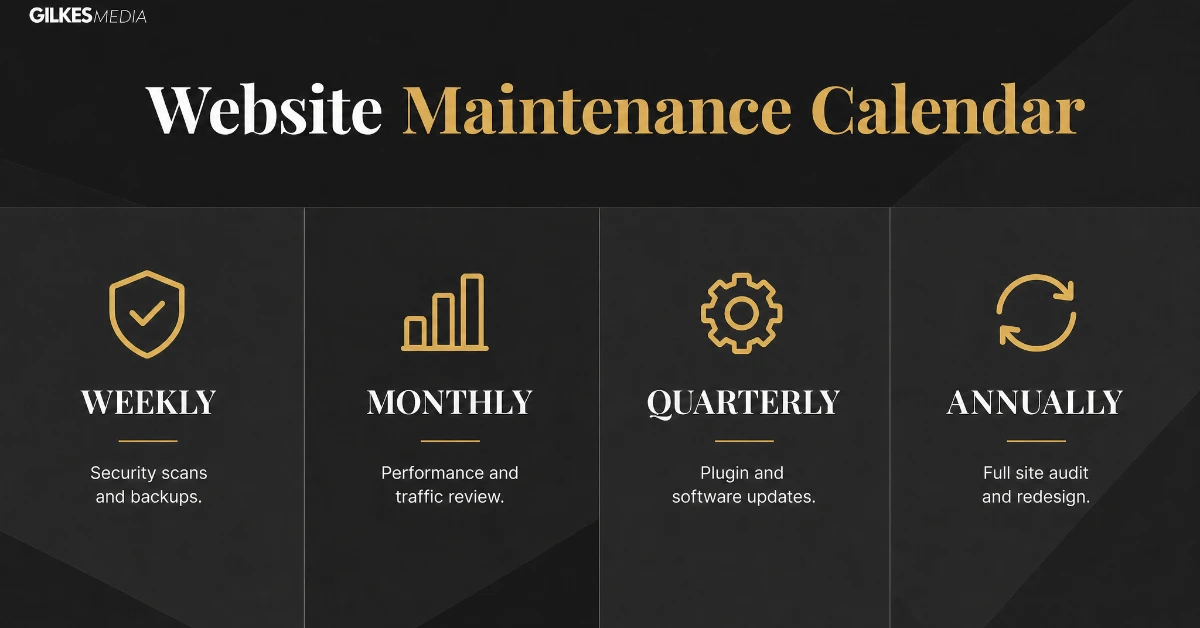
Weekly or automated: security scanning, backup verification, and monitoring for site uptime. Ideally, this runs automatically, so nothing depends on someone remembering to check manually.
Monthly: software and plugin updates, a broken link check, a review of 404 error logs, and a basic speed check against your site's normal benchmarks.
Quarterly: a fuller content freshness review, a check of form and functionality across the site's key conversion points, and a review of analytics for anything unusual worth investigating. That might be a sudden drop in a page's traffic, an unexpected rise in bounce rate, or a form that's stopped converting at its usual rate.
Annually: a more thorough technical and security audit, and a review of hosting arrangements and whether they still suit your site's current traffic and needs. It's also worth taking a genuine look at whether the site's underlying platform and structure still serve the business well, or whether a more substantial update is now the sensible route.
Our technical SEO audit checklist is a useful structure to work through for this annual deeper review.
If that review concludes a genuine rebuild or redesign is now the sensible route rather than incremental maintenance, our guide on redesigning your website without losing your SEO rankings covers how to make that transition safely.
| Frequency | What to do |
|---|---|
| Weekly or automated | Security scanning, backup verification, uptime monitoring |
| Monthly | Software and plugin updates, broken link checks, 404 log review, basic speed check |
| Quarterly | Content freshness review, form and functionality testing, an analytics check for anything unusual |
| Annually | A thorough technical and security audit, a hosting review, and a look at whether the platform still serves the business well |
A modest, ongoing maintenance routine typically costs a fraction of what a single reactive emergency ends up costing once it actually happens. That emergency might be a hacked site, a multi-week ranking collapse traced back to months of accumulated technical debt, or a full rebuild forced by a platform that's fallen too far behind to update incrementally.
Businesses that skip maintenance to save a modest ongoing cost frequently end up paying considerably more, in both direct cost and lost business during the disruption. This happens when neglect eventually catches up with them, and given enough time, it reliably does.
This is a straightforward cost-efficiency argument, not a scare tactic. A small, predictable, ongoing cost is genuinely cheaper over any realistic time horizon than the large, unpredictable cost of reactive emergency work.
It also comes with an added benefit. You never actually experience the disruption, lost enquiries, and reputational cost of a site going down or being compromised in the first place.

A realistic schedule layers weekly automated security scans and backups, monthly updates and a broken link check, and a quarterly content and functionality review. A modest ongoing maintenance routine typically costs a fraction of what a single reactive emergency - a hacked site, a ranking collapse, a forced rebuild - ends up costing once it actually happens.
An emergency recovery from a hacked or badly broken site involves a developer working under time pressure, lost business during the downtime, and sometimes reputational damage from visible errors or security warnings. This routinely costs many multiples of a year's worth of proper ongoing maintenance for the same site.
Proactive maintenance is a small, regular, easy-to-postpone cost. Reactive recovery is a large, sudden, impossible-to-ignore one. Businesses consistently underweight the first because its absence is invisible right up until the moment it very visibly is not.
If a full maintenance schedule feels like a lot to take on, start with just the weekly basics:
A UK manufacturing business had a website built four years earlier. Since then, it had received no updates beyond the occasional content edit an office administrator added directly.
When a client mentioned the contact form didn't seem to be working, an investigation found the form had been silently failing for approximately five months. This followed an update to a third-party service the form connected to, one nobody had tested afterward.
A rough, honest estimate suggested this had likely cost somewhere in the region of a dozen genuine enquiries that simply vanished rather than reaching anyone in the business. That's a meaningful loss for a business of their size and average deal value.
Beyond the form itself, the same site was running plugin versions several years out of date. Two known, publicly documented security vulnerabilities existed in the versions installed.
Bringing everything current and instituting a straightforward monthly maintenance routine cost considerably less than the value of the enquiries already lost through the broken form alone. It also removed a security risk that had been sitting there, unnoticed, the entire time.

If a full schedule feels like too much, start with the weekly basics: confirm backups actually ran, test the contact form still submits, and check for update notices waiting in the admin area. One manufacturing business found its contact form had been silently failing for five months after an unnoticed third-party update - a genuinely costly gap that a five-minute weekly check would have caught.
A confident, technically comfortable business, with someone willing to genuinely commit to a regular schedule, can handle straightforward maintenance internally. This works provided they treat it as a genuine recurring responsibility, rather than an occasional afterthought squeezed in whenever there's spare time.
For most businesses without that internal capacity or consistent discipline, a managed maintenance arrangement is the more realistic, lower-risk option. Here, updates, backups, and monitoring happen on a reliable schedule, regardless of how busy anyone internally happens to be that month, and it's considerably cheaper than the reactive alternative covered above.
Automatic updates are genuinely useful but don't remove the need for someone to check the site still works properly afterward - an update applied without testing key functionality is one of the most common mistakes that undermines an otherwise sensible plan. Handling maintenance internally works if it's treated as a genuine recurring responsibility, not squeezed in whenever there's spare time; most businesses without that capacity are better off bringing in help.
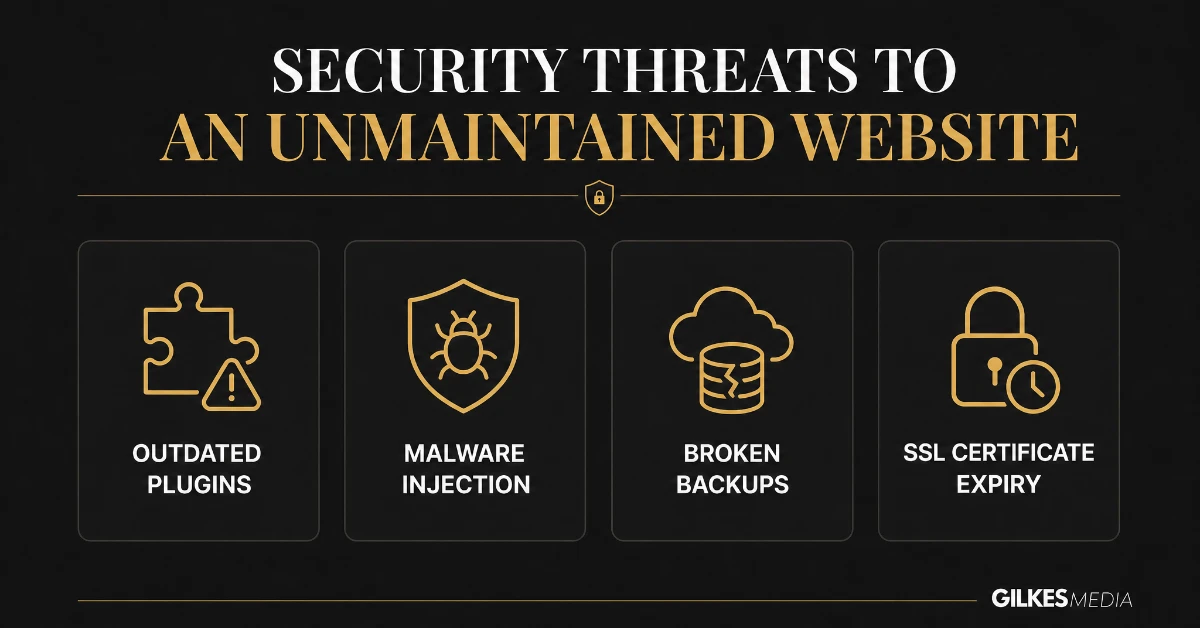
Of everything covered in this guide, security maintenance carries the most serious downside if neglected. Its consequences extend beyond a slow or outdated-looking site.
The overwhelming majority of WordPress site compromises exploit a known vulnerability in an outdated plugin or theme, not a sophisticated targeted attack. Keeping plugins current closes the door on the vast majority of opportunistic attacks. These attacks scan the web for exactly this kind of unpatched weakness.
An expired SSL certificate triggers browser security warnings that stop most visitors in their tracks immediately. It also actively damages both trust and search rankings for as long as it remains unresolved. Most hosting providers now auto-renew, but it's worth confirming this explicitly rather than assuming, particularly after any hosting migration.
Free tools checking SSL certificate expiry dates take seconds to run, and you can bookmark one as a monthly check. This catches a lapsed renewal before a single visitor ever sees a warning screen.
Take the site offline or into maintenance mode immediately to stop further damage. Restore from the most recent verified-clean backup, then change every password and API key associated with the site before bringing it back online. Investigate the specific vulnerability afterwards, rather than only restoring and hoping. That's what actually prevents an immediate repeat compromise.
Most businesses land on one of three approaches, and the right one depends more on site complexity and internal capacity than on budget alone.
A handful of well-regarded plugins can automate updates, backups, and basic security scanning. They're a genuinely reasonable starting point for a simple site, provided someone is willing to review alerts and act on them. They do not, however, replace human judgement when something more complex goes wrong.
Many hosts and agencies offer a maintenance package covering updates, backups, monitoring and a defined response time if something breaks. This suits businesses that want the work handled without building internal capacity. It's usually the better fit once a site is generating meaningful revenue or leads.
For larger organisations already running a marketing or IT function, assigning clear internal ownership of the maintenance schedule matters, even if the actual technical work is outsourced. This ensures nothing falls into the gap between departments that neither considers fully their job.
Security scanning and backups should run automatically, ideally daily or weekly. Software updates and broken link checks fit well monthly, with a fuller content and functionality review quarterly, and a complete technical audit annually.
The site becomes progressively more vulnerable to known security exploits that target unpatched versions specifically. The overwhelming majority of WordPress compromises exploit exactly this kind of neglected update, not a sophisticated targeted attack.
Only by testing a restoration periodically, not by assuming a backup file exists and is therefore usable. A backup that has never been restored, even once, is an unverified assumption rather than a genuine safety net.
Straightforward tasks like plugin updates and basic monitoring can often be handled in-house with the right tools. Security response, hosting decisions, and technical troubleshooting usually benefit from specialist involvement, particularly once something has already gone wrong.
Treating maintenance as reactive, fixing things only once they visibly break, rather than proactive. By the time a problem is visible to visitors, it has usually already been quietly costing conversions or search visibility for some time.
This varies considerably by site complexity and traffic, but a basic maintenance plan for a small business site is usually a modest monthly cost, considerably less than the cost of emergency recovery from a compromised or badly broken site.
If your site hasn't had a proper maintenance review in a while, or you're not entirely sure what state it's currently in, that uncertainty is itself worth resolving. Left alone, it can become an expensive surprise.
Our website design and development service includes ongoing maintenance as a core option. It's for clients who'd rather have this handled reliably than add it to an already full internal workload.
Get in touch through our contact page for a free discovery call. We'll give you an honest read on your site's current condition and what a sensible ongoing maintenance routine would look like for your specific setup. We won't push you toward more than your site genuinely needs at this stage.
A business that started with a maintenance plugin and finds itself regularly Googling how to fix a specific error has usually outgrown that level of self-management. The same is true of a business that has had more than one unplanned outage in a year. Similarly, a business paying for a generic maintenance plan while running increasingly complex custom functionality often needs something more. It's better served moving to a more specialist, hands-on relationship rather than a standard package.
The signal to watch for is not a fixed revenue or traffic threshold. It's a pattern of near-misses and small recurring issues, each individually minor, that together suggest the current level of oversight is no longer matched to what the site actually needs.
A site built on a well-supported, actively maintained platform, with a minimal, carefully chosen set of plugins, is considerably easier and cheaper to maintain. Compare that with one built on outdated technology, or bloated with dozens of overlapping plugins from years of ad hoc additions. Maintenance cost is, in part, a decision made at the original build stage, not purely an ongoing expense decided later.
Businesses evaluating a website rebuild or redesign are often focused entirely on how the finished site looks and converts. It's worth asking the developer directly how they'll maintain the proposed build, and what that maintenance is likely to cost annually. Raising this at that stage matters, since it meaningfully affects the total cost of ownership over the site's working life.
None of this needs to be complicated to get right. Most of what separates a well-maintained site from a neglected one is not sophisticated technical expertise. It is simply consistency: the same checks, run on the same schedule, month after month, rather than an occasional flurry of attention followed by long stretches of neglect.
Start with the weekly routine covered earlier in this guide, then build outward to the fuller monthly and quarterly checks as capacity allows. Treat the whole exercise as a standing part of running the business, rather than a project with a finish line.
A website is a working business asset: it generates enquiries, ranks in search, and represents the business to anyone who visits it. It deserves the same ongoing, unglamorous attention as any other asset the business genuinely depends on, rather than being treated as a one-off project that finished the day it launched.
Treat this guide as the starting checklist, not the finished answer, and revisit it once a year as your site, your team, and your traffic change. The right level of maintenance for a five-page brochure site is rarely still right once that same site has grown into a genuine lead generation engine.
That willingness to reassess, rather than setting a maintenance routine once and assuming it stays adequate forever, is what keeps a website genuinely reliable for years. Without it, a site is merely fine until the day something finally goes wrong.
Get the fundamentals in this guide in place, keep them running consistently, and reassess the approach as the business grows around the site. Do this, and website maintenance stops being a source of anxiety, becoming simply one more well-managed part of how the business operates.
Start this week, with whichever single item from the checklist above is currently least under control, and build outward from there.
That one item is usually easier to fix than it feels from the outside. Closing it off tends to make the rest of the schedule feel considerably more manageable too.
Momentum, more than any single tool or checklist, is what turns website maintenance from a chore into a genuinely low-effort habit.