A lot of businesses treat accessibility in one of two ways. Some see it as a legal box to tick for the public sector only. Others treat it as an expensive nice-to-have that can wait until there's spare budget.
Neither view is accurate. Both leave a business exposed to real risk. They also miss a genuine commercial upside that has nothing to do with compliance at all.
Here's a straight, practical guide to what UK businesses actually need to know and do.
Public sector websites in the UK must meet WCAG 2.1 AA standards, with clear enforcement and a requirement to publish an accessibility statement. If you run a public sector website, this isn't optional, and non-compliance carries genuine enforcement risk.
For private businesses, the position is less prescriptive but not absent.
The Equality Act 2010 requires businesses providing services to the public to make reasonable adjustments for disabled people. Courts and tribunals have interpreted this, in several cases, to extend to digital services, including websites, not just physical premises.
There's no single specific technical standard written into the Equality Act the way there is for the public sector regulations. But "reasonable adjustments" is generally understood in practice to mean working toward recognised standards like WCAG.
A genuinely inaccessible website that hasn't made any reasonable effort puts a business in a considerably weaker legal position. One that has made an effort stands in a stronger position.
GOV.UK's own guidance on the Equality Act 2010 sets out the broader duty this sits within.
Here's the honest, practical takeaway. If you're a private business, you're not necessarily facing the same specific enforcement mechanism as a public sector site.
But you are exposed to genuine legal and reputational risk if your website is inaccessible and you've made no reasonable effort to address it.
In any dispute, the standard asked of you is generally the same WCAG framework. It's the framework the public sector is explicitly required to meet.
| Public sector websites | Private business websites | |
|---|---|---|
| Legal basis | Public Sector Bodies Accessibility Regulations 2018 | Equality Act 2010 (reasonable adjustments) |
| Standard expected | WCAG 2.1 AA, explicitly required | No single named standard, but WCAG is the reference point used in disputes |
| Accessibility statement | Required | Not legally required, but good practice |
Setting the legal position aside entirely, there's a straightforward commercial case for accessibility that a lot of businesses underweight.
Around one in five people in the UK has a disability of some kind. That's a substantial proportion of the population by any measure. A meaningful share of these disabilities affect how someone uses a website day to day. Examples include low vision, colour blindness, and motor impairments affecting precise mouse use. Others involve cognitive differences that affect how easily dense or poorly structured content is processed.
A genuinely inaccessible website excludes a real, sizeable share of potential customers. It does this before they've even had the chance to consider what you're offering.
Accessibility improvements also frequently overlap with genuinely better usability for everyone, not just people with disabilities.
Clear heading structure, good colour contrast, and properly labelled forms all help. So does content that doesn't rely purely on colour or icon-only cues to convey meaning. Together, these tend to make a site easier and more pleasant to use for every visitor.
Several of these same factors overlap directly with good SEO practice. That's because search engines and assistive technology both benefit from a page that's clearly structured and properly marked up.

Public sector sites must meet WCAG 2.1 AA, with genuine enforcement risk. For private businesses, courts have interpreted the Equality Act 2010's duty to make reasonable adjustments to extend to websites too. Set the legal position aside, and there's a straightforward commercial case. Around one in five people in the UK has a disability. That disability can affect how they use a website day to day.
Colour contrast. Text needs sufficient contrast against its background to be readable for people with low vision or colour blindness.
Light grey text on a white background is a common "modern minimalist" design choice. It frequently fails basic contrast requirements. In fact, it's one of the most common accessibility issues we find on client sites during an initial audit.
Free contrast checker tools make this a quick, no-cost thing to verify across your site's actual colour palette.
Alt text on images.
Every meaningful image needs a text description that a screen reader can read aloud. That description should describe what the image actually conveys. It shouldn't be just a generic filename. Nor should it be a keyword-stuffed description written for SEO purposes rather than genuine usefulness to someone who can't see the image.
Purely decorative images that convey no information should be marked accordingly. That way, screen readers skip them entirely rather than reading out irrelevant descriptions.
Keyboard navigation.
Someone unable to use a mouse needs to reach every interactive element using only a keyboard. This might be due to a motor impairment, or simply a preference for keyboard navigation. Those elements include links, buttons, form fields and menus, each needing a clearly visible indicator showing which one currently has focus.
A surprising number of modern, visually polished sites fail this basic test. This is particularly true of custom dropdown menus and interactive widgets built without accessibility in mind from the start.
Properly structured headings.
Screen reader users frequently navigate a page by jumping between headings, rather than reading linearly from the top. This only works if headings are marked up properly in a logical hierarchy. It doesn't work if headings are merely styled to look like headings visually, while actually being plain, unstructured paragraph text underneath.
Descriptive link text.
Links that just say "click here" or "read more" are often repeated multiple times on a page. Out of context, they're meaningless to a screen reader user who's navigating by jumping between links on the page, a common assistive technology navigation pattern.
Descriptive link text, for example "read our website accessibility guide" rather than a bare "click here," is more accessible. It also happens to be better for SEO.
Forms with proper labels.
Every form field needs a genuine, programmatically associated label, not just placeholder text. Placeholder text disappears the moment someone starts typing. It leaves no record of what the field was for if they need to review their answers before submitting.
Captions and transcripts for video and audio content.
Anyone who's deaf or hard of hearing benefits from accurate captions. So does a meaningful share of everyone else who watches video with the sound off. A full transcript makes audio and video content accessible. It also, as a genuine side benefit, gives search engines readable text content from what would otherwise be an unindexable media file.
Headings need to follow a logical order: one H1, then H2s, then H3s nested under the relevant H2. They shouldn't be chosen for visual size. Screen reader users frequently navigate by jumping between headings. A page that skips levels, or uses headings purely for styling, makes that navigation genuinely confusing.
Every form field needs a properly associated label, not just placeholder text that disappears once someone starts typing. Error messages need to clearly state what went wrong and how to fix it. A generic "invalid input" message leaves a screen reader user with no way to identify the actual problem.
Placeholder text vanishes the moment a field is focused or filled. It offers no persistent label for a screen reader to announce later, and typically has weaker colour contrast than genuine label text. It looks fine visually but leaves several categories of visitor with no reliable way to know what a field is asking for.
A proper accessibility audit combines automated scanning tools, which catch a meaningful share of common issues quickly and cheaply, with genuine manual testing. Automated tools alone typically catch somewhere around a third of real accessibility issues.
If budget is genuinely limited, start with automated scanning to catch the more straightforward, high-volume issues. Then prioritise manual review of your highest-traffic and most commercially important pages. Avoid trying to comprehensively audit an entire large site manually all at once.
This is directly related to a broader technical SEO audit checklist. Several accessibility fundamentals, heading structure, alt text, and clean semantic markup among them, overlap directly with technical SEO health.

The most common fundamental businesses miss is colour contrast. Light grey text on white, a popular "minimalist" choice, frequently fails basic contrast requirements, and is checkable for free. Automated scanning tools alone typically catch only around a third of real accessibility issues. So a proper audit needs genuine manual testing alongside them.
Retrofitting accessibility onto an existing, poorly structured site is considerably more expensive and time-consuming. Building it in from the outset of a new site or redesign project costs far less.
If you're planning a rebuild, our guide on designing a B2B website that converts covers how to bake in genuinely good structure. That includes accessibility fundamentals, built into the design and development process from day one.
That's a better approach than treating accessibility as a separate compliance task tackled at the end. By then, the visual design is already locked in and harder to change without real cost.
Many mainstream WordPress themes and page builders have known accessibility weaknesses baked into their default components, particularly navigation menus and form styling. Checking a theme's accessibility track record before committing to it avoids inheriting problems. Fixing those problems later, once a site is built and full of content, is considerably more expensive.
A content team briefed to write descriptive alt text and use headings properly from day one produces a genuinely more accessible site. That beats relying entirely on a developer to fix things after the fact. Accessibility is as much a content and editorial discipline as a technical one. Treating it purely as a developer's problem misses half of what actually needs to happen.

Retrofitting accessibility onto an existing, poorly structured site is considerably more expensive than building it in from the start of a redesign. A beautifully designed site is not automatically an accessible one. Visual polish and accessibility are genuinely separate qualities. A site can fail badly on contrast, keyboard navigation or screen reader compatibility, however impressive it looks.
A form field outlined in red to indicate an error communicates nothing to a visitor who cannot distinguish that colour. That's especially true with no accompanying text or icon. Pairing colour with text, an icon, or both is a simple fix that protects against this specific, common failure.
Autoplaying media, particularly with sound, is disorientating for visitors using screen readers. They may have their own audio output competing with the page's. It's also simply a poor experience for most visitors, regardless of disability. And it's one of the easier issues on this list to fix outright.
You don't need a formal audit to catch the obvious issues. This quick check takes about ten minutes:
A UK-based professional services firm came to us after a client mentioned something, almost in passing. A colleague of theirs, who was colour blind, had struggled to read pricing tables on their site.
An honest audit turned up considerably more than that single issue. It found contrast failures across most of the body text against a fashionable light grey background. It also found a booking form with placeholder-only labels that disappeared once a field was clicked into. And it found a main navigation menu that was entirely unreachable using a keyboard alone.
None of these issues were visible to the team internally. That's because everyone testing the site day to day was using a mouse and had typical colour vision. They also already knew the site well enough to navigate around any friction without noticing it.
Fixing the contrast issues and form labels took a matter of days and cost very little.
Rebuilding the navigation menu to be genuinely keyboard accessible took longer, closer to two weeks of development time. However, the firm folded that work into a planned redesign that was happening anyway, rather than commissioning it as a separate emergency project.
Beyond the accessibility improvement itself, the firm noticed a modest but real drop in bounce rate on the pages with the worst original contrast issues. This was a reminder that accessibility fixes frequently improve the experience for every visitor. That's true not only for the specific share of visitors who have a disability that made the original issue a genuine barrier for them.
A ten-minute self-check catches most obvious issues: tab-only keyboard navigation, meaningful alt text, 200% zoom, contrast, and captions on video. One firm's audit was triggered by a single offhand comment about a colour-blind client struggling with pricing tables. It turned up contrast failures across most of the site, plus a booking form whose labels disappeared once clicked into.
Start with an honest, thorough audit, automated and manual, to understand your actual current position rather than guessing.
Prioritise fixes by genuine impact and effort. Contrast and alt text issues are usually quick, low-cost fixes with immediate benefit. Deeper structural or custom interactive component issues, by contrast, may need more significant development work.
Fix the highest-impact, lowest-effort issues first to make quick, genuine progress. Then work through the more involved fixes on a realistic timeline. Trying to do everything at once tends to stall the whole project under its own perceived scale.
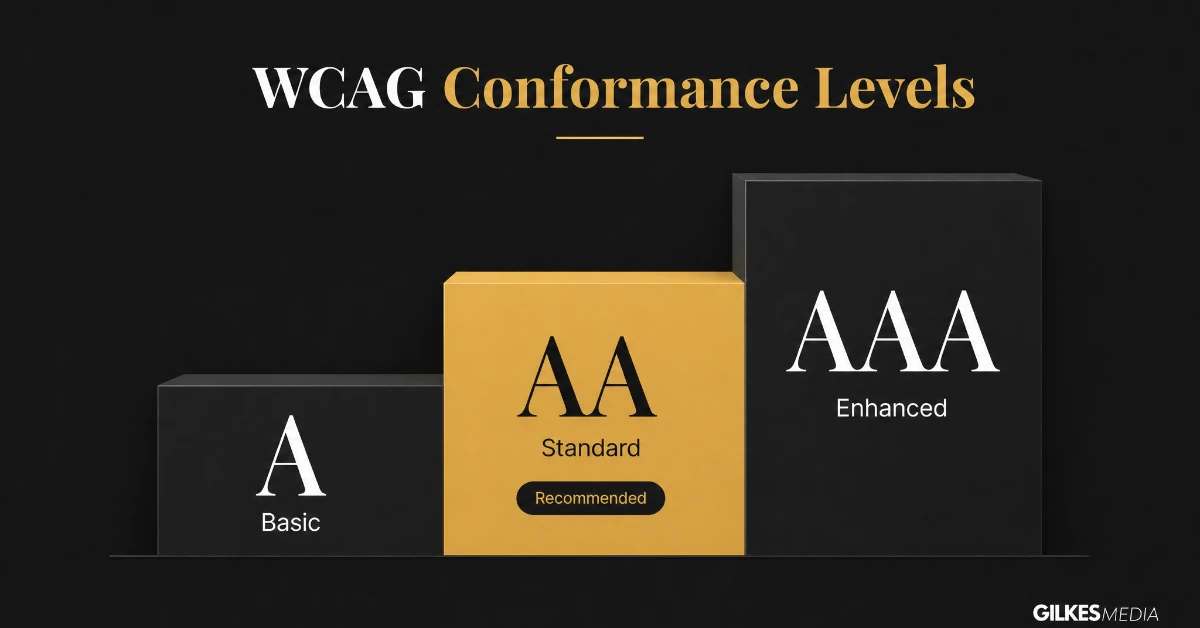
Web Content Accessibility Guidelines, or WCAG, define three conformance levels. Knowing which one your business should realistically target avoids both under- and over-investing.
Level A covers the most basic accessibility barriers. These are barriers that would make a site literally unusable for some visitors if left unaddressed. Meeting only Level A is rarely defensible for a genuine UK business website. It's best treated as an absolute floor, not a target.
WCAG 2.2 Level AA is the standard referenced by the UK's own public sector accessibility regulations. It's also widely treated as the reasonable, defensible target for private business websites too. It covers colour contrast, keyboard navigation, clear labelling and a wide range of the fundamentals covered elsewhere in this guide.
Level AAA includes some criteria that are genuinely difficult or impractical for many types of content to meet fully. Sign language interpretation for all video content is one example. It's worth knowing AAA exists. But AA remains the sensible, realistic target for the overwhelming majority of UK business sites.
AA is not a compromise. For almost every UK business, meeting WCAG 2.2 Level AA properly is genuinely good practice, not merely the minimum defensible position.
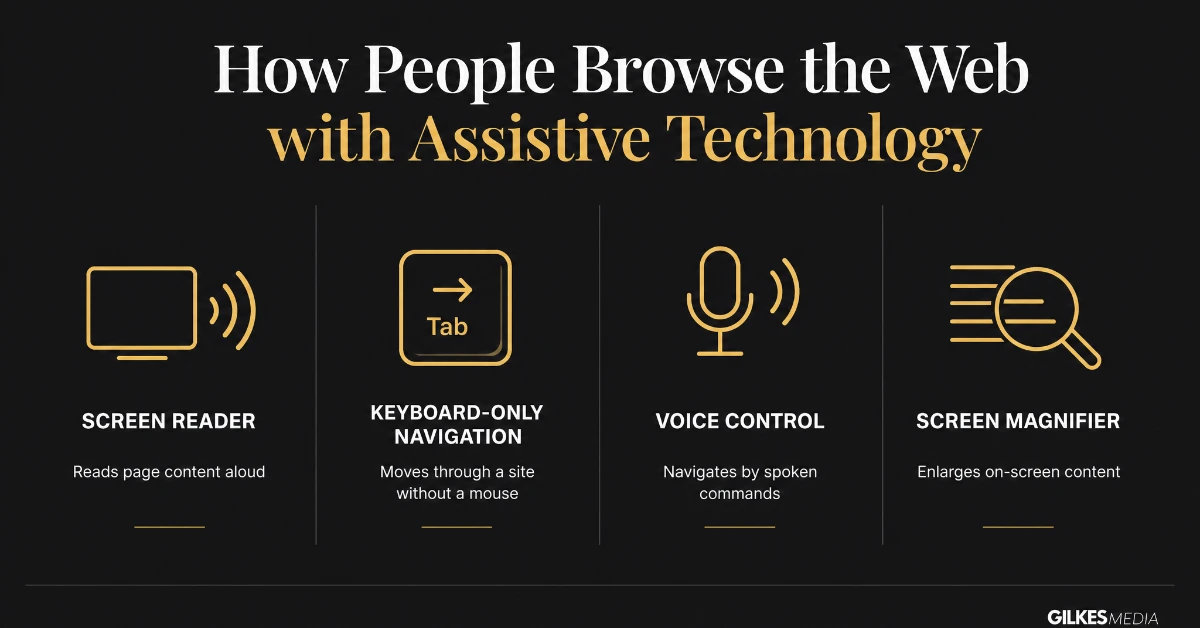
Accessibility guidelines can feel abstract until connected to the actual assistive technology they are written to support.
Screen readers are software that reads page content aloud, or converts it to braille. They rely entirely on proper heading structure, alt text and semantic HTML to make sense of a page. A sighted visitor, in contrast, understands that same page visually at a glance.
Many visitors with motor impairments, and some with no disability at all, navigate entirely by keyboard, tabbing between links and form fields. A site where the focus order is illogical locks these visitors out. So does a custom dropdown that can't be operated without a mouse.
Voice control software relies on clear, unique labels on buttons and links. These labels let someone say a command and activate the right element. Screen magnifiers are used by visitors with low vision. They need a layout that still makes sense when only a small portion of the page is visible at high zoom. A fixed-width design can break that entirely.
For public sector bodies, yes, under specific accessibility regulations. For private businesses, the position runs through the Equality Act 2010’s duty to make reasonable adjustments for disabled customers, which courts have increasingly applied to websites, even without a website-specific private-sector law.
WCAG 2.2 Level AA is the widely recognised, defensible standard referenced across UK guidance and most legal precedent, and is a realistic target for the overwhelming majority of business websites.
Poor colour contrast, particularly light grey text on white backgrounds, is one of the most frequently found issues during an initial audit, alongside missing or poor-quality alt text on meaningful images.
A self-check using free tools catches many of the most common issues and is a sensible first step. A full audit, ideally including testing with real assistive technology, catches issues a purely automated check misses, and is worth the investment for any business generating meaningful leads through its site.
Often yes. Proper heading structure, descriptive alt text and clear semantic markup are valued by both assistive technology and search engines, which is why accessibility and technical SEO overlap more than most businesses realise.
This varies considerably by how the site was built and how many issues exist, but most of the highest-impact fixes, contrast, alt text, heading structure, are genuinely low-cost to address, considerably cheaper than a full rebuild.
Accessibility is genuinely achievable for a business of any size. It doesn't need to become a full-time specialist discipline, as long as it's approached properly. That means not relying on a shortcut plugin, or ignoring the issue entirely.
Our website design and development service includes accessibility as a core part of how we build and improve client sites. It's not an optional extra bolted on at additional cost.
Get in touch through our contact page for a free discovery call. We'll give you a straight, practical assessment of where your site stands and what's genuinely worth doing first. There's no pressure toward a bigger project than your site actually needs.
An estimated one in five people in the UK lives with a disability that could affect how they use a website. That's a meaningful share of any business's potential audience. A site with genuine accessibility barriers is, in very direct commercial terms, actively turning away a portion of its own addressable market. It does this before a single sale conversation even starts.
This commercial framing tends to land better internally than the legal or ethical case alone. That's particularly true with stakeholders focused primarily on revenue and conversion. Accessibility work, framed correctly, is closer to expanding addressable market than it is to pure compliance cost. Both arguments are true simultaneously.
None of this needs to happen all at once. Prioritise by impact: colour contrast and alt text first, since both are quick to fix and affect nearly every page. Then work through heading structure, form labelling and keyboard navigation. Doing this in order gets most sites to a genuinely defensible AA position within a matter of weeks, rather than requiring a full rebuild.
A phased plan, agreed and tracked, also gives a business something concrete to show if accessibility is ever formally raised. A genuine, documented pattern of improvement carries real weight, both legally and reputationally, compared with no action taken at all.
A site fixed for accessibility today can drift out of compliance within months. New pages, new plugins or a redesign of one section can all introduce fresh issues nobody checked. Building a basic accessibility check into the same content and development review process already used for quality control keeps the improvement genuinely permanent. That's a better approach than treating it as a one-off project, which leaves it as a temporary state that quietly erodes.
Treat accessibility as a standing quality bar that every new page and feature needs to clear. Spelling, broken links and mobile responsiveness already work that way. Don't treat accessibility as a separate audit exercise revisited only once a year or after a complaint. That single shift in how the work is organised does more to keep a site genuinely accessible over time. It matters more than any individual fix covered in this guide.
Start with the self-check earlier in this guide. Prioritise the fixes that carry the most impact for the least effort. Then build accessibility into how the business reviews its website going forward. That combination gets a UK business to a genuinely defensible, genuinely more usable position. That's the actual point, well beyond simply avoiding a legal letter.
A genuinely accessible site also tends to be a genuinely better site for everyone. Clearer structure, better contrast and more usable forms rarely make an experience worse for a visitor without a disability. That's one more reason this work is worth doing properly, rather than treating it as a narrow compliance exercise aimed at a single audience.
That is worth keeping in mind whenever accessibility work gets pitched internally as a cost with no upside beyond risk reduction. It rarely works out that way in practice.
Approach it that way from the start. Then accessibility becomes one more genuinely worthwhile investment in the website, not a defensive box-ticking exercise everyone would rather avoid.
That reframe alone, from cost to investment, is often what finally gets accessibility properly resourced inside a business. Otherwise, it stays perpetually deprioritised behind whatever feels more urgent this quarter.