
A website that looks great and loads slowly is, in practical terms, still failing its visitors. It quietly turns them away before they ever see how good it looks.
Site speed and Core Web Vitals often get talked about as a technical SEO checkbox, something a developer sorts out once and forgets about. In reality, it's closer to an ongoing conversion problem hiding inside a technical one.
A slow site doesn't just rank worse. It loses real leads every single day, often without anyone in the business noticing. There's no obvious error message, just a steady trickle of visitors who leave before the page even finishes loading.
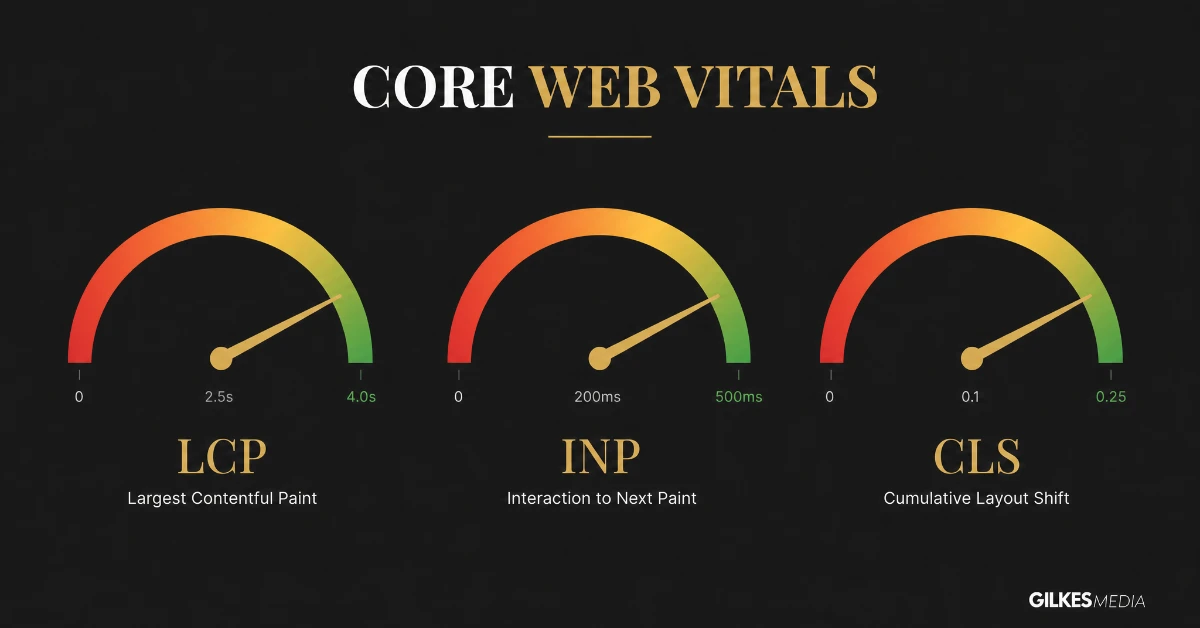
Core Web Vitals are a specific set of metrics Google uses to judge real-world page experience. They measure genuinely different things, rather than one vague "speed score."
Largest Contentful Paint, or LCP, measures how long it takes the biggest visible element on the page to actually render. That's usually a hero image or headline.
This is the metric closest to what a visitor experiences as "how long until this page loaded."
Interaction to Next Paint, or INP, measures how responsive the page feels once someone actually tries to use it, clicking a button, opening a menu, or filling in a form field. Specifically, it tracks how long the page takes to visibly respond.
A page that loads quickly but then freezes for a second every time someone taps something feels broken. That's true even if the initial load was fast.
Cumulative Layout Shift, or CLS, measures how much the page visually jumps around as it loads. Images popping in shove text down, and buttons shift right as an ad loads in beside them.
Beyond being annoying, this is a genuine cause of mis-clicks and abandoned forms. It happens when someone taps a button just as the layout shifts underneath their finger.
| Metric | Good | Needs improvement | Poor |
|---|---|---|---|
| LCP (Largest Contentful Paint) | Under 2.5s | 2.5s–4s | Over 4s |
| INP (Interaction to Next Paint) | Under 200ms | 200ms–500ms | Over 500ms |
| CLS (Cumulative Layout Shift) | Under 0.1 | 0.1–0.25 | Over 0.25 |
One specific element, whether that's a hero image, a large heading, or a banner, almost always determines LCP. Fixing it usually just means fixing that element's loading speed, rather than the whole page. Identifying which element counts as "largest" on your key pages, using PageSpeed Insights, is the first useful diagnostic step.
INP replaced an older metric called First Input Delay in 2024. It measures responsiveness across the whole visit, rather than just the first interaction. Heavy JavaScript execution, particularly from third-party scripts, is the most common cause of poor INP on business websites.
Images or ads without reserved space, or web fonts swapping in and reflowing text, usually cause CLS. Content injected above existing content, after the page has already rendered, can too. It is often the cheapest of the three metrics to fix, once the specific cause is identified.
Google has confirmed Core Web Vitals are a ranking factor. It's a comparatively modest one, though, against the weight of genuinely relevant, well-optimised content. Where the real cost usually shows up is conversion, not rankings.
Industry research on page load time consistently shows conversion rates dropping sharply as load time increases past around three seconds. A meaningful share of visitors will simply leave a slow page before it's finished loading. They never see your offer, your form, or your phone number at all.
A page that ranks perfectly well but loses a third of its visitors to abandonment before it loads is still failing commercially. That's true even if the SEO report looks fine.

Core Web Vitals measure real page experience, not one vague speed score, and Google confirms they're a ranking factor. But the bigger cost usually shows up in conversion rate long before it shows up in your rankings.
A handful of common, fixable issues explain most poor scores we see when auditing a client's site for the first time.
A hero image exported straight from a camera or stock library is often several megabytes, uncompressed and far larger than its display size. It's the single most frequent cause of a poor LCP score seen across client sites.
Many WordPress themes and visual page builders load CSS and JavaScript for every feature they support. That's true whether a given page actually uses it or not. A page built with a handful of simple blocks can still load megabytes of unused code, simply because of how the underlying theme is structured.
Page builders like Elementor and Divi are popular precisely because they are flexible. That flexibility, however, comes from loading a large, general-purpose codebase on every page. A site built entirely in a page builder, without any cleanup, frequently carries this cost on every single page, regardless of how simple that page actually is.
Hosting that performs fine for a low-traffic brochure site can become the genuine bottleneck once a site adds a blog, more images, and real ongoing traffic. Shared hosting in particular can suffer when a neighbouring site on the same server has a traffic spike. That spike can drag response times down for everyone on it.
Google's free PageSpeed Insights tool gives you both lab data, a simulated test run, and genuine field data drawn from real visitors using Chrome. Field data is the more useful of the two. It reflects what's actually happening for real people on real devices and connections, rather than just a single test under ideal conditions.
Google Search Console's Core Web Vitals report shows the same field data, aggregated across your whole site and grouped by which specific pages are failing and why. This is generally the better starting point if you're trying to prioritise fixes across a larger site, rather than testing pages one at a time.

Most poor scores trace back to the same handful of causes: oversized images, too many third-party scripts, and render-blocking code. PageSpeed Insights' field data, drawn from real visitors, matters more than a single simulated lab test when you're diagnosing which of these is actually hurting you.
Compress and properly size every image before it goes anywhere near the site. Serve modern formats like WebP too, rather than defaulting to large JPEGs and PNGs.
This alone resolves a meaningful share of LCP problems we find on client sites.
Defer or remove third-party scripts that aren't earning their keep. A genuinely useful chat widget is worth the small cost to load time. A tracking pixel nobody's looked at the data from in a year almost certainly isn't.
Use a proper caching setup, whether that's a caching plugin on WordPress or a caching layer built into your hosting. This stops the site rebuilding pages from scratch on every visit.
Reserve space for images and embeds before they load, using explicit width and height attributes. This stops the page visually jumping once they arrive.
Finally, genuinely evaluate your hosting. A bargain hosting package that was fine for a five-page brochure site often becomes the actual bottleneck once a site grows into a proper marketing asset with real traffic.
Site speed doesn't sit in isolation from the rest of your website's performance.
Our technical SEO audit checklist covers Core Web Vitals as one part of a much wider technical health check. It's worth treating it that way, rather than fixing speed in isolation and assuming the rest of the site's technical foundation is fine.
It also sits directly alongside conversion rate work. A fast page that still doesn't clearly state its offer, or make it easy to act, won't convert well regardless of load time. Our guide on improving your website conversion rate is worth reading alongside this one, rather than treating speed and conversion as two entirely separate projects.
If you're planning a redesign rather than fixing an existing site in place, building genuinely good performance in from the start is considerably cheaper than retrofitting it later. Our guide on redesigning your website without losing your SEO rankings covers how to carry that discipline through a rebuild properly.

Compress and properly size your images, cut the third-party scripts that aren't earning their keep, and cache properly, and speed stops being a one-off fix. It sits inside your wider technical SEO and CRO work, not as a separate job done once and forgotten.
Independent research from Google and multiple e-commerce platforms has consistently found that conversion rate drops meaningfully as page load time increases past around three seconds. It continues declining the longer a page takes. A faster site converts a higher share of the same traffic without needing a single change to the offer or the copy.
A landing page with excellent copy and a compelling offer still loses visitors if it takes six seconds to become interactive. Our guide on website design and CRO covers this properly. The short version, though, is that speed is a CRO fundamental, not a separate technical concern sitting apart from conversion work.
Fixing speed once and never checking again.
New content, new plugins, and new third-party scripts creep back in over time. A site that scored well after a clean-up can quietly drift back to a poor score within months. This often happens without anyone noticing, until it shows up in a ranking or conversion dip.
Chasing a perfect lab score while ignoring real field data.
A page can look flawless in a single simulated test and still perform poorly for actual visitors on an average mobile connection. That's exactly why Google's field data, drawn from real users, matters more than a one-off lab test.
Treating every third-party script as untouchable.
Marketing teams often resist removing tracking or widgets they added months ago and forgot about. Yet an honest, periodic review of what's actually still earning its place on the page is one of the highest-value, lowest-cost speed fixes available.
You don’t need a full audit to get a first read on where you stand:
The two mistakes that undo speed work fastest are fixing it once and never checking again, and chasing a perfect lab score while ignoring how the site actually performs for real visitors on an average mobile connection. Run the self-check regularly, not just after a clean-up.
A UK professional services firm had a site that looked polished and modern. Even so, it was converting noticeably below what its traffic volume suggested it should.
A speed audit found an LCP of over five seconds on the homepage, caused mainly by an unoptimised 4MB hero image and six separate third-party scripts. Several of these scripts turned out to be tools nobody on the team had used in over a year.
Compressing and properly sizing the hero image, removing four of the six unnecessary scripts, and adding a proper caching layer brought LCP down to under two seconds within a week. All this happened with no design changes at all.
Over the following month, bounce rate on the homepage dropped noticeably and form completions rose. This wasn't because anything about the offer or the design had changed. It was because considerably more visitors were actually staying on the page long enough to see it.
Google publishes specific pass/fail thresholds for each metric, measured at the 75th percentile of real visits, not a lab average. Knowing the actual numbers turns a vague sense of "the site feels slow" into something you can genuinely measure and fix.
| Metric | Good | Needs improvement | Poor |
|---|---|---|---|
| Largest Contentful Paint (LCP) | Under 2.5s | 2.5s – 4.0s | Over 4.0s |
| Interaction to Next Paint (INP) | Under 200ms | 200ms – 500ms | Over 500ms |
| Cumulative Layout Shift (CLS) | Under 0.1 | 0.1 – 0.25 | Over 0.25 |
A site needs to hit "good" on all three at the 75th percentile to pass Google’s Core Web Vitals assessment overall. Passing two out of three is not a pass; the weakest metric determines the outcome.
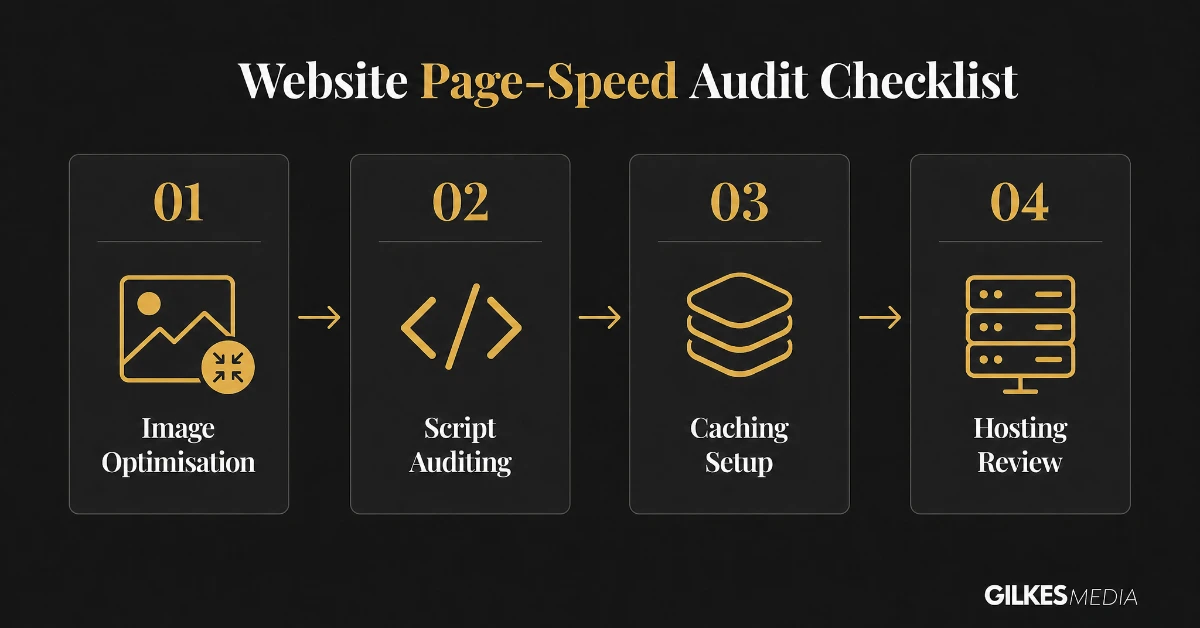
Working through issues in the right order matters, since some fixes make others easier. Tackling them randomly wastes time on changes that won't move the score much.
Before touching anything else, audit every image above the fold, resize to the actual display dimensions, compress properly, and convert to WebP. This single pass resolves a meaningful share of LCP problems on most sites we assess. It also takes far less time than most other fixes on this list.
Every analytics tag, chat widget, and marketing pixel adds its own loading and execution cost. Auditing what is actually installed, and removing anything nobody has looked at the data from recently, often trims a surprising amount of load time. This matters most on sites that have accumulated tracking scripts over several years.
Optimising images and scripts before addressing hosting means you are not paying to serve a bloated page faster. Instead, you are making a genuinely lean page even quicker. Doing hosting and caching work first can mask underlying bloat, rather than fixing it.
Fix images first, since it needs no technical skill beyond a compression tool. Then get a developer or agency to handle scripts, caching and any code-level layout shift issues in one focused pass. That's a better approach than tackling them as several separate, smaller jobs spread across months.
A site that passes Core Web Vitals after a proper fix can quietly regress within months, if nobody keeps an eye on it. This usually happens as new content, plugins or tracking scripts get added without anyone checking the speed impact.
A new plugin installed for one feature, a marketing team adding another tracking pixel, or a new blog post with unoptimised images can each individually seem trivial. Yet they accumulate. Sites we have fixed in the past have regressed within six months purely through this kind of gradual, unmonitored addition.
None of this requires ongoing technical expertise once the initial fix is in place. It simply requires treating speed as a standing item to check, the same way a business might review analytics or rankings. It's not a one-off project that gets considered finished once it's done.
Google measures three metrics (LCP, INP, CLS) against specific thresholds at the 75th percentile of real visits. A page needs "good" on all three, LCP under 2.5s, INP under 200ms, CLS under 0.1, to pass overall.
Yes, they are a confirmed ranking factor, though a relatively minor one compared with content relevance and backlinks. Where two pages are otherwise similarly matched for a search, Core Web Vitals can be the deciding factor.
Unoptimised images are the most common cause of poor LCP specifically, and LCP is usually the metric businesses fail first. Compressing and properly sizing images resolves a meaningful share of cases on its own.
Google’s free PageSpeed Insights tool gives both a lab test and, for sites with enough traffic, real-world field data from Google’s own Chrome User Experience Report, which is the more accurate reflection of what visitors actually experience.
Image compression and removing unused third-party scripts can often be done without development help, particularly on WordPress with the right plugins. Layout shift and script-execution fixes usually need a developer’s involvement.
Image and basic script fixes can often be done within a day or two. A full pass including caching, hosting review and layout shift fixes typically takes one to two weeks depending on how complex the site is.
Site speed is one of the few technical SEO issues that's genuinely quick and inexpensive to diagnose, and often surprisingly cheap to fix. Yet it's routinely overlooked, because there's no obvious symptom beyond a vague sense that a site "feels a bit slow."
If you're not sure where your site currently stands, that's worth finding out properly. Don't just guess from how fast it feels on your own fast office connection and modern laptop. That's rarely how most of your actual visitors are experiencing it.
Our website design and development service includes a proper Core Web Vitals assessment as standard, not an optional extra bolted on afterwards.
Get in touch through our contact page for a free discovery call. We'll give you an honest read on where your site's speed currently stands, and what's actually worth fixing first.
The worked example is the point worth remembering: removing one oversized image and four unused scripts took LCP from five seconds to under two, with no design changes at all, and bounce rate and form completions moved within a month. Speed is cheap to diagnose and often cheap to fix.
Image compression, removing unused plugins, and basic caching setup are within reach for most business owners or in-house marketing teams. This is particularly true on WordPress with the right tools. Layout shift that theme code causes, along with third-party script optimisation and hosting migration, usually needs a developer's involvement to fix properly and safely.
A reasonable approach for a business without technical staff is a one-off professional audit and fix, followed by the maintenance routine above run in-house. That's a better fit than an ongoing retainer, for something that mostly needs monitoring rather than continuous expert intervention, once it's fixed properly.
Mobile traffic now makes up the majority of visits for most UK business websites. Mobile connections are also inherently more variable than desktop broadband, which makes speed problems more visible and more damaging on the device most visitors are actually using. Google collects its own field data overwhelmingly from real mobile visits. That's exactly why a site that feels fine on a fast office desktop connection can still be failing Core Web Vitals for the majority of its actual audience.
Competition for search visibility has also increased across most sectors since Core Web Vitals became a ranking factor. This means businesses that treat it as a genuine priority, rather than a box to tick once, increasingly separate themselves from competitors still running on an unoptimised, ageing site.
Treat the numbers in this guide as a genuine health check, rather than an abstract technical concern. A site failing Core Web Vitals is, in very concrete terms, losing search visibility it could otherwise have. It's also losing a measurable share of visitors who arrive, wait, and leave before the page even finishes rendering properly.
Fixing it is rarely as expensive or disruptive as businesses assume, once they know exactly where to start: images first, then scripts, then hosting. The return, whether in rankings, in conversion rate, or in a site that simply feels more trustworthy to use, tends to arrive faster than most other website investments.
If you have not checked your own Core Web Vitals scores in the last few months, that is the actual first step. Do it before any of the fixes above. PageSpeed Insights takes under a minute to run, and will tell you plainly which of the three metrics is actually failing. That, in turn, tells you which section of this guide to focus on first, rather than trying to fix everything at once.
Most sites that fail Core Web Vitals fail on one metric specifically, usually LCP, rather than all three equally. Knowing which one narrows the fix considerably. It stops the whole exercise feeling like an overwhelming rebuild, when it is often a focused, achievable piece of work.
Run the check, identify the weakest metric, and work through the relevant section of this guide. Do this before committing to a bigger project. Most businesses find the fix is more contained, and considerably cheaper, than they feared before actually looking at the data.
That five-minute check is the difference between guessing at a website problem and actually knowing what to fix. It's worth doing before reading any further advice on the subject, including everything covered here.
Speed is one of the few technical SEO factors a business can measure objectively, fix in a bounded, well-understood way, and then verify directly. That makes it one of the better places to start, if website performance has felt like a vague, unmeasurable problem up to now.
Start with the check, and work through whichever section applies. Then revisit it as a standing part of maintaining the site, rather than a project you close out and forget about once the score turns green.
That ongoing attention, more than any single fix in this guide, is what keeps a properly performing site properly performing for years. Without it, that site tends to slide quietly back to where it started, within a year of the original work.
Get that habit in place, and Core Web Vitals stops being a recurring worry. It becomes simply one more number, alongside rankings and conversion rate, that a well-run site keeps a steady, quiet eye on.