
Type "how much do Google Ads cost" into Google and you'll get a dozen different answers. There genuinely isn't one number. The real Google Ads cost UK businesses pay depends heavily on your industry and goals.
Google Ads runs on a real-time auction. What you pay depends on who else is bidding for the same search at the same moment. That auction is exactly why a click for "personal injury solicitor" can cost eight times more than one for "birthday card shop".
Understanding what drives that gap is the actual answer to what Google Ads costs, so that's where we'll start.

Every Google search that matches your keywords triggers an auction among every advertiser bidding on it. Your position and cost per click are decided by a mix of your bid and your Quality Score.
Quality Score matters more than most advertisers realise. It measures how strong your ad and landing page are for that specific search.
Google rewards ads and landing pages that genuinely match what someone searched for with a lower cost per click. It penalises a generic one with a higher price at the same bid. This is why two businesses bidding on the same keyword can pay very different amounts.
The one with a tightly relevant ad and landing page will often pay less per click. A competitor throwing the same generic page at every keyword pays more for the same click.
Google runs a fresh auction for every single search, weighing your bid against your Quality Score. Together these produce what it calls Ad Rank. A high Quality Score can let a lower bidder outrank a higher one. That's exactly why relevance can be cheaper than simply outbidding competitors.
Google Ads uses a second-price auction: you pay just enough to beat the advertiser ranked below you, not your maximum bid. A strong Quality Score lowers that threshold. That's the mechanical reason relevance translates directly into a lower cost per click, not just a vague best practice.
High-volume, generic keywords are rarely the most cost-efficient choice. Longer, more specific search terms usually cost less per click and convert at a meaningfully higher rate. That's because the person searching already knows more precisely what they want.
Cost per click varies enormously by sector, driven mainly by how much a single customer or client is worth. Industries selling something high-value and considered pay considerably more per click than low-margin, high-volume ones.
| Sector | Typical CPC | Range |
|---|---|---|
| Legal services | £8.25 | £4.50 – £15.00+ |
| Financial services | £5.50 | £3.00 – £10.00 |
| B2B SaaS | £3.65 | £2.00 – £6.00 |
| Home services | £3.20 | £1.50 – £5.50 |
| Recruitment | £2.10 | £1.00 – £4.00 |
| Retail / e-commerce | £0.95 | £0.40 – £2.00 |
Most UK small businesses land somewhere between £1.50 and £2.50 a click once you average across a full account. London-based campaigns typically run 15-30% higher than the rest of the UK. That's purely down to more competitive bidding in the capital.
Quality Score matters more than most advertisers realise. Two businesses bidding on the same keyword can pay very different amounts. Google rewards a genuinely relevant ad and landing page with a lower cost per click. That gap shows up directly in your industry's typical cost per click.
These are sensible starting points, not fixed prices. Your actual cost depends on your industry, keyword competitiveness, and how considered your sale is.
A modest testing budget: roughly £600 to £1,500 a month. Google Ads needs slightly more than Meta to gather usable data. Search volume for your exact keywords is naturally capped.
A genuine lead generation budget: roughly £1,500 to £5,000 a month. This is where most established UK businesses land once Google Ads is a properly optimised, ongoing channel.
For a closer look at getting Google Ads working specifically as a lead generation channel, see our guide to Google Ads for lead generation.
A scaled, multi-campaign budget: roughly £5,000 to £20,000+ a month. It typically covers several campaigns across match types, locations, or product lines, with enough historical data for stable, predictable delivery.
A business with a long, considered sales cycle needs a larger testing budget than these bands suggest. That's simply because it takes longer for a click to become a confirmed customer. The account also needs enough volume to produce a usable number of full-cycle results within a reasonable timeframe.
A £20,000 a month account is not simply ten times a £2,000 one run for longer. At that scale, campaigns typically need splitting by product line, location, or match type to stay manageable. Testing new keywords or formats can also happen far faster, because there's enough volume to reach statistical confidence within days rather than weeks.

A handful of factors explain most of this gap. Some businesses pay a sensible rate for their keywords. Others are quietly overpaying for the exact same ones.
The budget bands above are starting points, not fixed prices. The same factor keeps coming back: Quality Score. A genuinely relevant ad and landing page cuts your cost per click. A generic page bidding on the same terms costs more.
Quality Score is Google’s own 1-10 rating of how relevant your ad and landing page are for a specific keyword. You can see it directly in the platform. It is not just a vanity metric: moving from a 5 to an 8 can lower cost per click by a meaningful margin on the same keyword and bid. That's simply because Google rewards relevance directly in the auction.
A sensible default for most UK accounts is to start new keywords on phrase match. This gathers data while keeping some control over relevance. Once a keyword has enough volume to justify it, move it to exact match. Reserve broad match for well-established campaigns that already have a strong negative keyword list in place.
A brand new Google Ads account has no click or conversion history for Google’s algorithm to learn from. It typically pays a premium in the first few weeks, compared with an established account bidding on the same terms. This settles as data accumulates. That's one more reason judging a new account too early gives a misleadingly expensive picture.
These three platforms answer different questions. The cost comparison only makes sense once that's clear. Google Ads targets people actively searching for a solution. That means higher intent, and usually a shorter path to conversion.
Our guide on Meta Ads cost in the UK covers a channel that interrupts rather than captures existing intent. It generally runs at a lower cost per click, but takes a longer journey to conversion.
Our guide on LinkedIn Ads cost in the UK covers the platform at the opposite end. It's priced highest of the three, but capable of job-title-level precision neither Google nor Meta can match.
For most B2B businesses, a blended approach works best. Google Ads catches people already searching for a solution. Meta or LinkedIn build awareness earlier in the decision, before anyone's actively searching at all.

The headline monthly spend is rarely the whole cost. Landing page work is the most commonly missed one.
A generic homepage sends your Quality Score down and your cost per click up. A dedicated page built for the specific search is a real cost of running Google Ads properly. It's not an optional extra.
Conversion tracking setup is another. Without accurate tracking of calls, form fills and genuine sales, you're optimising an account against guesswork. That usually costs considerably more than the setup itself would have.
Someone also needs to actively manage the account. Search terms drift and competitors change their bids. A neglected account gradually drifts toward its most expensive, least efficient default settings.
Google, Meta and LinkedIn answer different questions. Comparing their costs only makes sense once you're clear on what each one is capturing. Whichever you choose, the landing page is a real cost of running the campaign properly. It's not an optional extra once the ad budget's set.
Treating landing page work as a one-off setup task, rather than an ongoing part of the campaign, is a common blind spot. Pages need revisiting as offers, pricing and competitor positioning shift. A page that performed well a year ago can quietly stop earning the Quality Score benefit it once did.
Basic form-fill tracking is a start. Call tracking and offline conversion imports, feeding closed-won sales data back into Google Ads, give the algorithm far better signal to optimise against. Most UK accounts running on form tracking alone are optimising with a meaningfully incomplete picture.
Budgeting purely for media spend, and treating management as free (whether that's an agency fee or an internal hour), is how accounts drift toward their most expensive default settings. Picture a genuinely unmanaged account, left to Google’s own automated bidding with no oversight. Within a few months it reliably costs more per lead than one reviewed weekly.
A UK B2B software company set aside £2,500 a month to test Google Ads for the first time. It targeted a handful of high-intent commercial keywords. Cost per click sat higher than expected in the first month.
This was mostly down to a generic landing page dragging down Quality Score.
Building a dedicated landing page for the top three keywords, tightening match types, and adding a proper negative keyword list brought cost per click down by around a quarter within six weeks. None of this needed any change to the bid strategy.
The lesson wasn't that Google Ads was expensive from day one. It was that the landing page and keyword structure were doing as much work as the bidding itself.
Three habits waste Google Ads budget fastest: broad match with no negative keywords, every click landing on the homepage, and judging performance after a few days. The worked example shows why a rough first month is usually worth persevering through, not pulling the plug on. A proper landing page fix is usually the answer.
Not all Google Ads spend behaves the same way. The campaign type you choose changes both the typical cost per click and what that click is actually worth. Mixing them up is a common reason a budget underperforms.
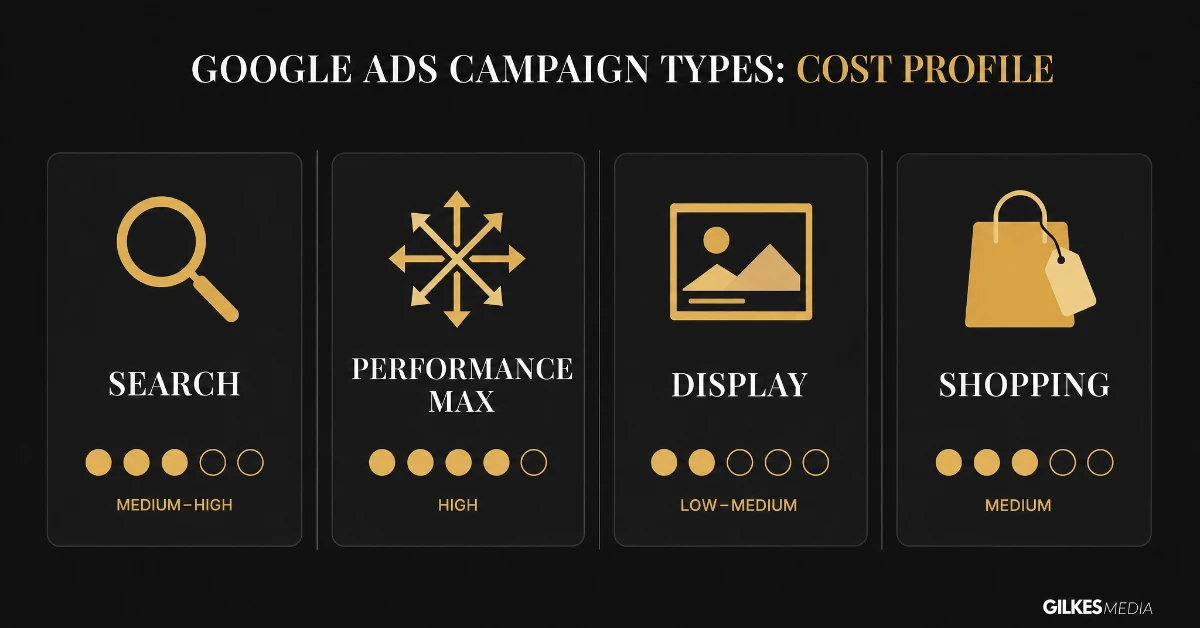
Standard Search campaigns, bidding on keywords against text ads, carry the highest cost per click of the four. That's because they capture the clearest, most immediate intent. They are usually the right starting point for a new account. That clear intent makes performance easier to read.
Performance Max runs across Search, Display, YouTube, Gmail and Shopping from a single campaign, optimised automatically by Google’s own machine learning. Blended cost per click can look competitive on the surface. But the lack of channel-level visibility makes overall spend harder to control. Total cost frequently runs higher than a well-managed, Search-only account for the same conversion volume. That's simply because it's harder to spot and fix inefficiency inside a blended campaign.
Display ads are shown across Google’s partner network of websites and apps. They typically cost a fraction of Search per click, often 10-20% of the equivalent Search rate. But they convert at a much lower rate too. They suit remarketing and awareness far better than direct lead generation.
Shopping campaigns show a product image, price and store name directly in results. They generally see a lower cost per click than standard Search text ads for the same retail terms. They typically convert at a higher rate too, because the searcher already knows the price before clicking.
The cheapest campaign type on paper is not always the cheapest way to get a genuine customer. Match the campaign type to what the click is actually worth once it converts.
Lowering cost per click is straightforward if lead quality doesn’t matter. Doing it while protecting quality takes more discipline, but these are the levers that reliably work.
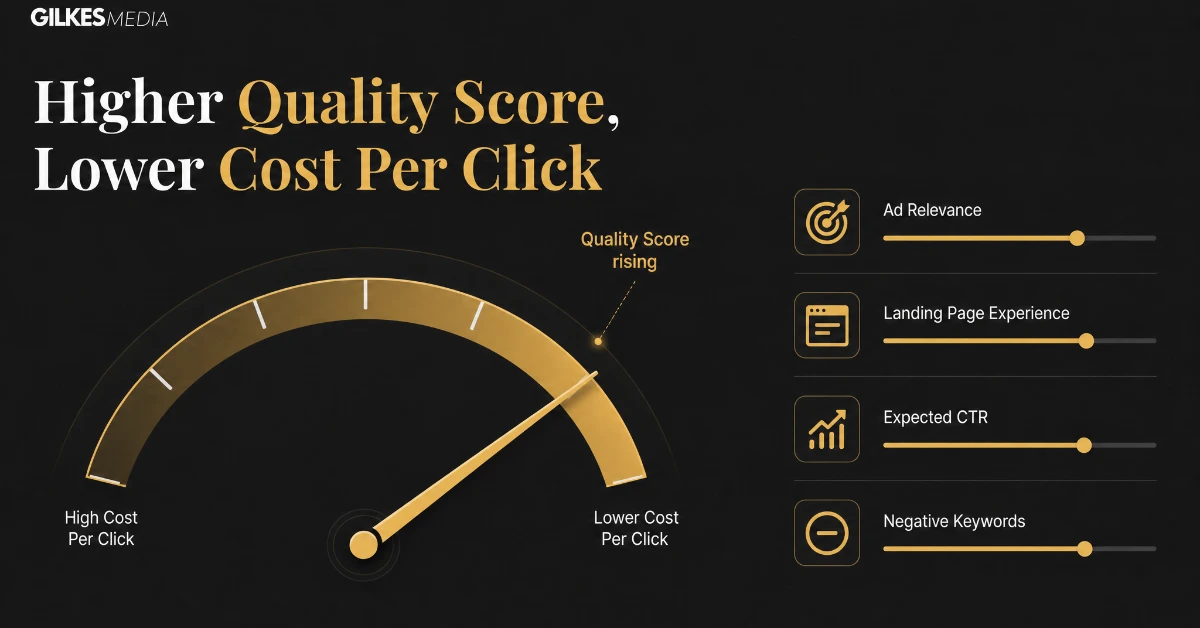
Quality Score is not a single lever but three combined: expected click-through rate, ad relevance, and landing page experience. Rewriting ad copy to mirror the exact language of the keyword moves all three at once. So does building a landing page that answers that specific search, rather than a generic one.
A negative keyword list stops broad match spend leaking onto searches with no commercial intent. It's one of the fastest ways to lower blended cost per click without touching bids at all. Review the search terms report weekly in the first month, then monthly after that. This keeps the list current as language and competitor behaviour shift.
Bid down, or pause entirely, during hours and locations that historically produce clicks but not conversions. That frees budget to be spent more heavily where it actually converts. Effective cost per lead falls, even when the headline cost per click barely moves.
Start broader to gather search term data, then narrow to phrase or exact match on the terms that actually convert. This typically lowers cost per click over time. The account accumulates a cleaner, more relevant history, and Google’s auction rewards that.
Most of the figures in this guide are UK-wide sector averages. Turning them into a number your business can actually commit to takes one more step.
Work out what a converted customer is worth to your business. Then work out what conversion rate you can reasonably expect, from click to customer, based on your sales process. Together, these give you a maximum viable cost per click for your specific business. That figure may sit well above or below the sector average, depending on how valuable your average customer actually is.
Four to six weeks at a consistent budget is the minimum most accounts need. That's enough time to exit the cold-start phase and produce a fair picture. In the first week, cost per click is naturally higher and the algorithm has no history to optimise against. Judging performance that early is one of the most common reasons businesses abandon Google Ads prematurely.
Daily fluctuations in cost per click are normal and rarely worth reacting to. A monthly review, looking at cost per click, conversion rate, and cost per lead together, gives a far more reliable picture. It tells you whether the account is actually improving, which daily numbers alone can't.
It depends entirely on your industry. Retail and e-commerce often sit under £1. Legal and financial services commonly pay £5-15 or more per click. Compare your cost per click against your own sector’s typical range, not a generic UK average.
A modest testing budget usually starts around £600-1,500 a month, enough to gather a genuine signal within a few weeks. A properly optimised ongoing campaign for most established UK businesses typically runs £1,500-5,000 a month.
Usually a Quality Score problem: a generic landing page, ad copy that doesn’t mirror the keyword, or a low expected click-through rate. It can also simply reflect more competitive bidding in your specific area or niche.
Blended cost per click is often lower, because Performance Max spreads spend across cheaper placements like Display and YouTube alongside Search. But that lower average can mask genuinely poor performance in one channel. Google doesn’t break out cost per channel by default, so you can't easily see it.
Give a new campaign at least one to two weeks for Google’s algorithm to exit its learning phase before drawing conclusions. A full, fair read usually needs four to six weeks of consistent spend.
Per click, usually yes - it captures people already searching with clear intent. Whether it's more expensive per lead or per customer depends entirely on conversion rates. That's a fairer comparison than cost per click alone.
There isn't one correct Google Ads budget for every business. But there is a sensible way to arrive at one. Start with enough spend to gather real data on your specific keywords. Build a landing page that actually matches the search. Then give the account a fair run before judging it.
Working out your genuine customer acquisition cost before you commit to a monthly figure helps a great deal. It gives you a much clearer sense of whether a given cost per click actually makes sense for your business.
If you're weighing up whether Google Ads makes sense for you, that's worth talking through before you commit any spend. The same goes if you just want an honest read on what a realistic budget looks like for your market.
Our paid ads management service covers Google, Meta, LinkedIn and TikTok. We'll always tell you honestly if a different channel is likely to work harder for your budget.
Get in touch through our contact page for a free discovery call. We'll give you a straight, realistic view of what Google Ads would cost for your business.
Below roughly £1,500 a month, the management overhead of a specialist often outweighs the value they can add. Running the account carefully in-house tends to make more sense at that level. Above that, particularly once an account spans several campaign types or a Performance Max campaign with limited visibility, specialist management usually pays for itself. There's simply more time needed to manage it properly, and the cost of getting Quality Score or match type strategy wrong gets bigger at scale.
A useful middle ground for growing accounts is a one-off audit and setup from a specialist. That's followed by in-house management with an agreed quarterly check-in. It's a lighter commitment than full ongoing management, until the account has proven it can sustain that spend profitably.
Of everything covered here, the landing page is the most consistently underused lever. Businesses will happily spend hours refining bids and match types. All the while, they send every click to the same generic page they've used for years. Rebuilding even one page around a specific offer and keyword theme often moves cost per click more than a month of bid adjustments. Cost per lead usually follows.
It is also the cheapest lever to test. A single new landing page variant, tested against the existing one for a few weeks, costs a fraction of what most businesses spend testing new keyword themes or campaign types. It frequently produces a larger, faster improvement in blended cost per click across the whole account too.
Bring the pieces in this guide together: sensible budget bands, an honest read on hidden costs, a proper Quality Score strategy, and a landing page built for the click it's actually receiving. Do that, and Google Ads stops being an unpredictable cost centre. It starts behaving like the reliable channel it can genuinely be, for a UK business that treats it properly.
That is a more useful place to end up than chasing the lowest cost per click on a dashboard. The number on its own tells you very little. What it costs to acquire a genuinely good customer, tracked consistently over time, is the figure worth actually managing towards.
Every range in this article is a genuine UK benchmark, not an invented figure. But benchmarks describe averages across thousands of accounts, with very different offers, sales processes and customer values. A cost per click meaningfully above the sector average is worth investigating. But it's not automatically a sign something is wrong. It may simply reflect a more valuable customer, or a more competitive niche, than the average account in that sector faces.
The businesses that get the most out of Google Ads treat every figure here as a starting question, not a verdict. Is our cost per click higher because we're inefficient? Or are we competing for a genuinely more valuable customer than the average? Answering that honestly is worth more than chasing the benchmark number for its own sake.
Get that question right, and the rest of this guide becomes genuinely useful: the sector benchmarks, the campaign type comparison, the hidden costs. It stops being a set of numbers to chase blindly.
And that, ultimately, is what separates two kinds of businesses. One gets genuine, predictable value from Google Ads year after year. The other keeps restarting the same conversation about whether the platform is "worth it", every time a quarter looks disappointing.
Treat the account as a genuine, ongoing part of the business, rather than a switch to flip on and off. Do that, and the number on the invoice each month starts making a great deal more sense.
That consistency, more than any single tactic in this guide, is what matters most. It's what turns Google Ads from a cost that gets questioned every quarter into a channel a UK business can genuinely plan around.
Get the fundamentals right: a sensible budget, honest cost expectations, a proper Quality Score strategy. Do that, and Google Ads becomes one of the more predictable lines in a marketing budget, not one of the most anxious ones.