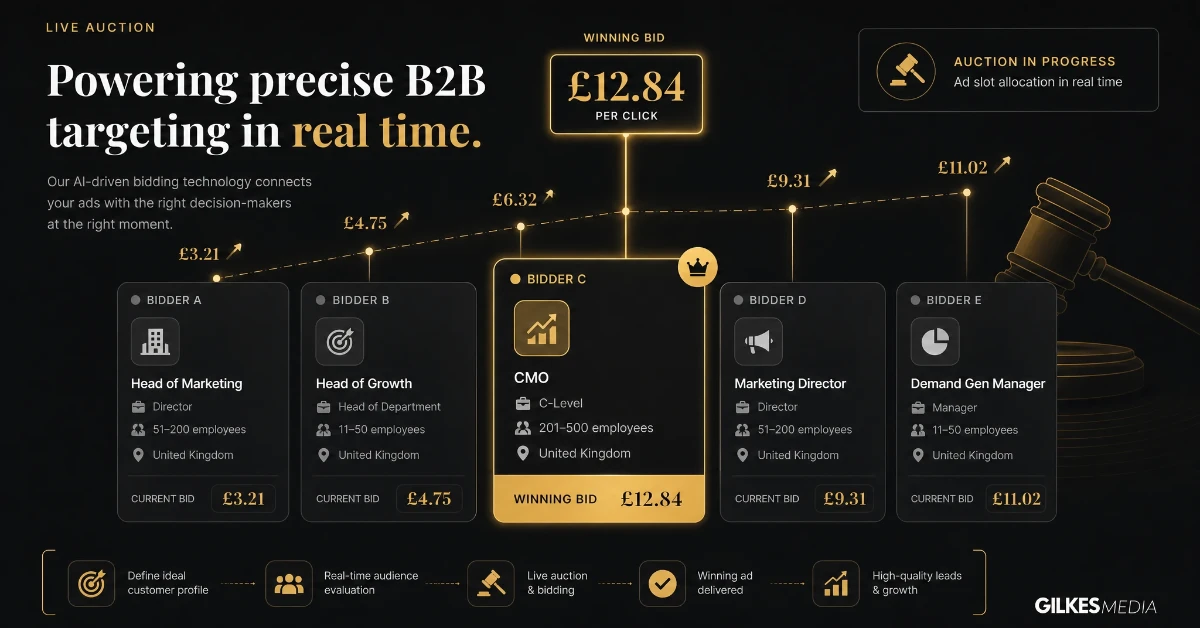
Ask a LinkedIn account manager what a click costs and you'll get a shrug, not a number. That's not evasion. LinkedIn Ads run on a live auction, just like Meta and Google, so your actual cost depends entirely on who else wants the same audience at the same moment.
What's different is who that audience is. LinkedIn lets you target by job title, seniority, company size, and industry with a precision no other platform matches. That precision is exactly why it costs more, and why it's still worth it for the right business.
LinkedIn sells ad space through an auction, priced either per click, per thousand impressions, or per send for Message Ads. Your bid competes against every other advertiser targeting the same job titles, seniority levels, or company sizes at that moment.
Narrow, senior, high-value audiences push costs up fast. Targeting "marketing directors at UK software companies with 50-200 staff" puts you in a small, contested pool. Targeting "marketing professionals in the UK" is broader and considerably cheaper, but far less precise.
This is the trade-off every LinkedIn campaign makes. You're paying a premium specifically for the ability to reach exact job titles and seniority levels, not for raw reach.
LinkedIn runs a second-price-style auction similar in spirit to Google’s: you generally pay just enough to beat the next-best competing bid for that same audience, not your full maximum bid. A more relevant, higher-engagement ad can still win a placement more cheaply than a generic one bidding higher.
Competing advertiser demand for the same job titles and seniority levels fluctuates, particularly around hiring seasons, budget cycles and industry events, when more advertisers chase the same narrow professional audience at once. A campaign that looked efficient in one month can look more expensive the next for no reason related to its own performance.
A useful mental model: every targeting filter you add is a lever between cost and precision, not a free upgrade. Company size, seniority, function and skills each narrow the pool and each raise the price, so the right combination depends on how tightly your actual buyer persona is defined, not on adding every available option.

These are sensible starting points based on what typically works for UK B2B businesses, not fixed prices. Your actual cost per result depends on your industry, audience size, and how competitive your specific job titles are.
A modest testing budget: roughly £500 to £1,200 a month. LinkedIn's own platform minimums mean you need more here than you would on Meta just to gather usable data from two or three ad variations.
A genuine lead generation budget: roughly £1,200 to £4,000 a month. This is where most established B2B businesses land once LinkedIn is a proper, ongoing part of the marketing mix.
A scaled, multi-campaign budget: roughly £4,000 to £15,000+ a month. This tier typically supports several campaigns running in parallel across different job titles, industries, or funnel stages.
| Budget tier | Monthly spend | Best suited to |
|---|---|---|
| Testing | £500 – £1,200 | Validating a new audience or offer before you commit further |
| Lead generation | £1,200 – £4,000 | Established B2B businesses running LinkedIn as an ongoing channel |
| Scaled | £4,000 – £15,000+ | Multiple parallel campaigns across job titles, industries or funnel stages |
LinkedIn's auction rewards precision and punishes it in the same breath. Narrow, senior job titles put you in a small, contested pool that pushes your cost per click up fast, so the real budget bands depend far more on how tightly you're targeting than on any fixed price.
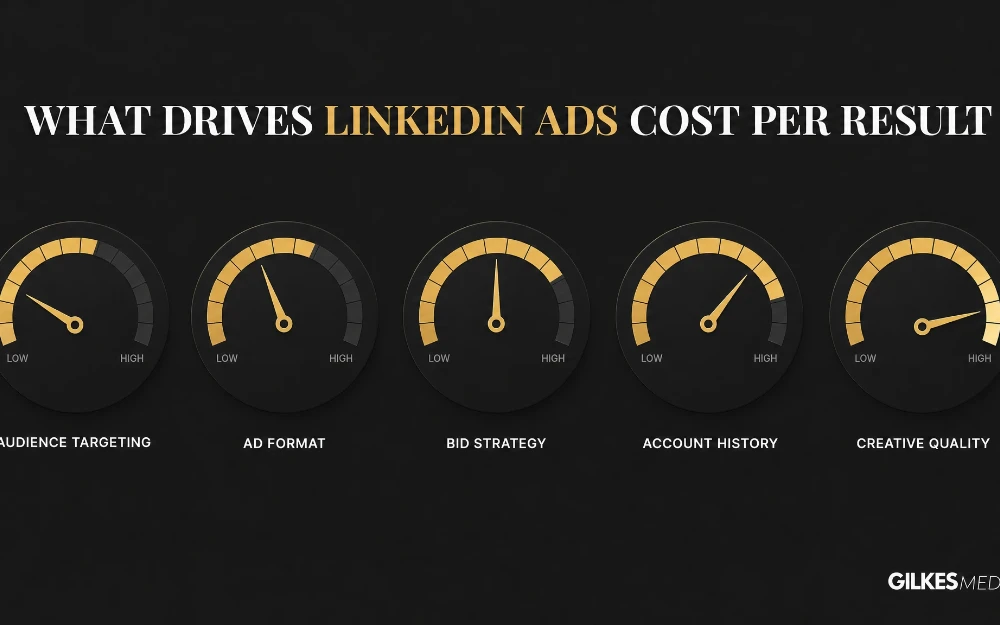
A handful of factors explain most of the difference between a business getting genuinely efficient results and one burning through budget for very little.
Manual bidding gives direct control and suits an account with someone actively managing it week to week. Automated bidding is easier to set and forget, but without regular review it can drift upward, particularly once a campaign has been running unchanged for several months.
Choosing Single Image Ads for a campaign that would genuinely benefit from Message Ads’ directness, or the reverse, wastes budget regardless of how good the targeting is. The format needs to match the offer’s stage in the buying journey as much as the audience needs to match the persona.
LinkedIn costs three to five times more per click than Meta, and often more per click than Google Ads too. That premium buys you something neither platform can genuinely match: precise professional targeting by job title and seniority.
Our guide on Meta Ads cost in the UK covers a considerably cheaper platform, better suited to broader consumer audiences than tightly defined B2B buyers.
Our guide on SEO versus PPC covers a similar cost-versus-precision trade-off in more depth, and the same underlying logic applies here.
For a considered, high-value B2B sale, LinkedIn's premium is usually worth paying. For a lower-value product or a broad consumer audience, it rarely is.
Job title precision, ad format and bid strategy explain most of the swing in your cost per result. LinkedIn typically costs three to five times more per click than Meta, but that premium buys professional targeting neither platform can genuinely match.
The premium is easiest to justify when the buyer persona is genuinely narrow, senior decision-makers at companies of a specific size in a specific sector, and when the value of a single converted customer comfortably covers a higher cost per lead. For a broader, lower-value offer, that same precision is often wasted money.
A common, sensible pattern for established UK B2B businesses is LinkedIn for precision targeting and account-based approaches, Google for capturing people already searching, and Meta or TikTok for cheaper top-of-funnel awareness. Each channel is doing a distinct job, and the blended cost across all three is usually a more useful number to optimise than any single platform’s cost in isolation.
If TikTok is on your radar as that cheaper top-of-funnel channel, we’ve covered whether it’s actually worth it for B2B in TikTok Ads for B2B.
The advertised monthly ad spend is rarely the whole cost on LinkedIn. A few extras catch businesses out more often here than on other platforms.
Creative production for multiple formats adds up. A campaign running single image, carousel, and Message Ads variations needs distinct creative for each, not one asset reused everywhere.
A learning phase cost is also worth expecting. Every time you materially change targeting or creative, delivery becomes less efficient for a period while LinkedIn's system re-learns who responds best.
Someone also needs to actually manage the account. LinkedIn's targeting options are powerful but genuinely fiddly, and a neglected account drifts toward its most expensive, least efficient default settings.
Budgeting for one set of ad creative and expecting it to work across Single Image, Carousel and Message Ads is a common underestimate. Each format genuinely performs better with creative built for it specifically, which is a real, recurring cost beyond the media spend itself.
Every material change to targeting or creative resets some of LinkedIn’s delivery efficiency while the algorithm re-learns who responds best. Businesses that change targeting constantly, chasing small improvements, often pay more in accumulated learning-phase inefficiency than they save from the changes themselves.
LinkedIn’s targeting options are powerful but genuinely fiddly to manage well. Treating the account as something to set up once and leave running is one of the more reliable ways to watch cost per result creep upward over a few months.
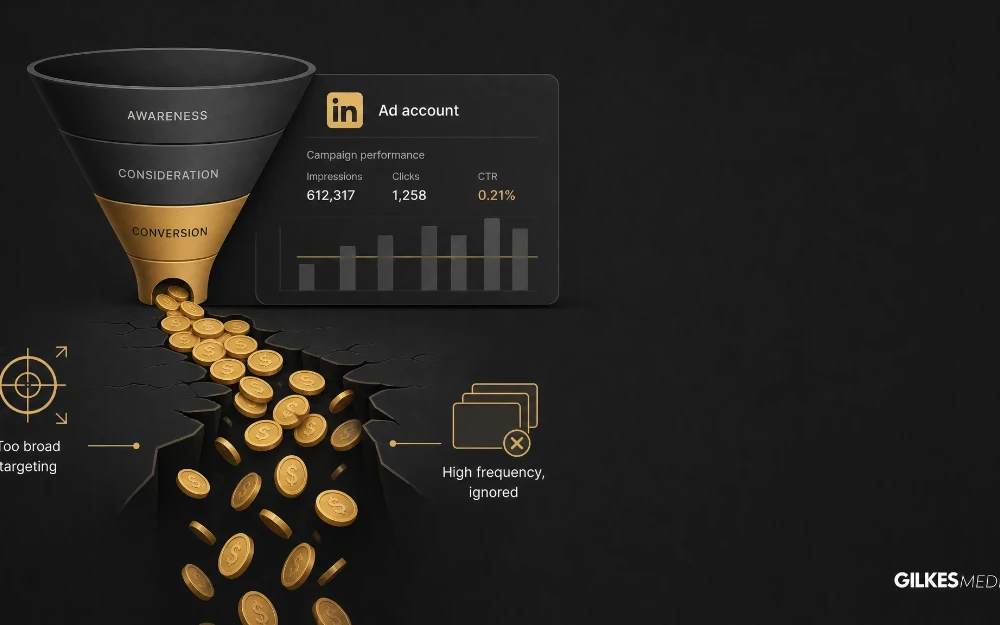
A handful of avoidable mistakes account for most of the wasted spend we see on LinkedIn accounts we're asked to review.
Budget for creative across every format you run, expect a learning-phase dip whenever you change targeting, and don't assume the account will manage itself. LinkedIn's targeting is powerful but fiddly enough that someone needs to actually be watching it.
A UK B2B software company set aside £2,000 a month to test LinkedIn Ads for the first time, targeting IT directors at mid-sized companies. In the first month, cost per lead sat noticeably higher than hoped, largely down to the learning phase and one overly broad ad set.
Rather than pulling the budget, they narrowed the audience slightly, paused the weakest ad set, and let the campaign run into a full second month. Cost per lead dropped by roughly a third once the learning phase settled and only the sharper targeting remained.
The lesson wasn't that LinkedIn was cheap from day one. It was that judging performance properly meant waiting for the platform to actually settle before drawing conclusions.
LinkedIn offers several distinct ad formats, and the right choice depends on the objective, not just which one looks cheapest on the surface.
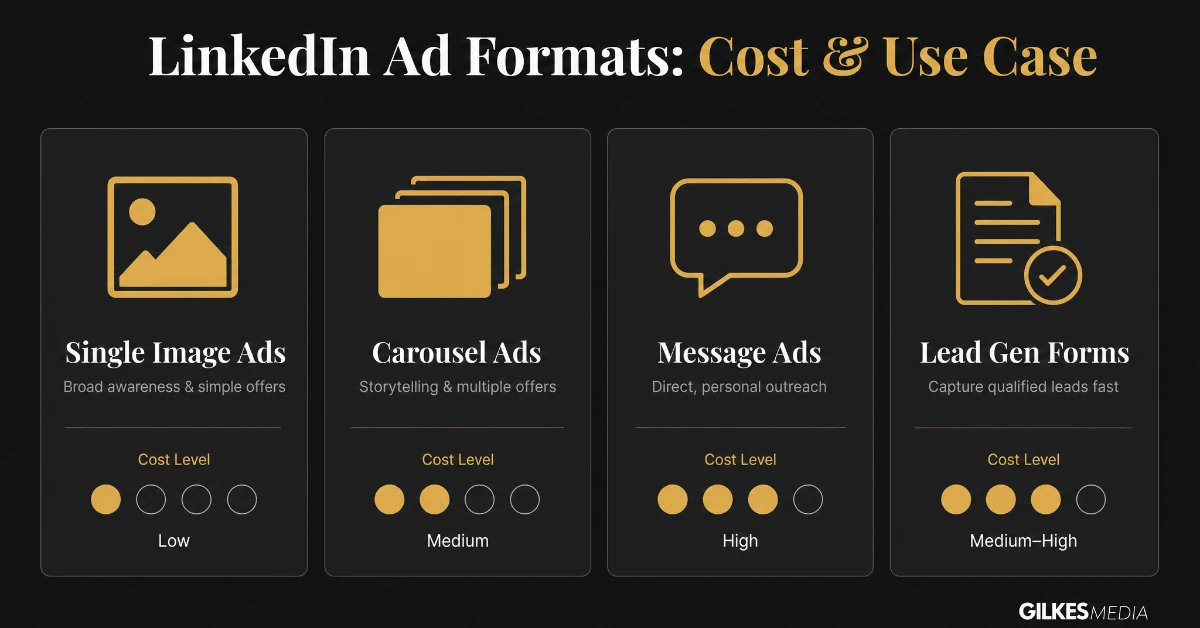
The simplest and usually cheapest format per click, Single Image Ads work well for straightforward awareness or traffic campaigns with one clear message and call to action. They are the sensible starting format for a new account still building engagement history.
Multiple swipeable cards let you tell a short sequential story, walk through a process, or showcase several offers in one unit. Cost per click sits close to Single Image Ads, but engagement tends to run higher when the sequence is genuinely worth swiping through.
These land directly in a prospect’s LinkedIn inbox, priced per send rather than per click. They cost considerably more per contact than feed formats, but response rates for a genuinely relevant, personal-feeling offer can justify the premium, particularly for higher-value B2B offers.
LinkedIn’s native lead form pre-fills a prospect’s profile data, so submitting takes one tap rather than a full form. This consistently lifts conversion rate compared with sending traffic to an external landing page, though, as with any native form, the leads it produces are worth qualifying properly before assuming they are sales-ready.
On LinkedIn, format and objective need to match. The cheapest format per click is rarely the cheapest way to reach the outcome you actually want.
LinkedIn’s premium pricing is the cost of precision, but there is real room to bring cost per result down without abandoning that precision.
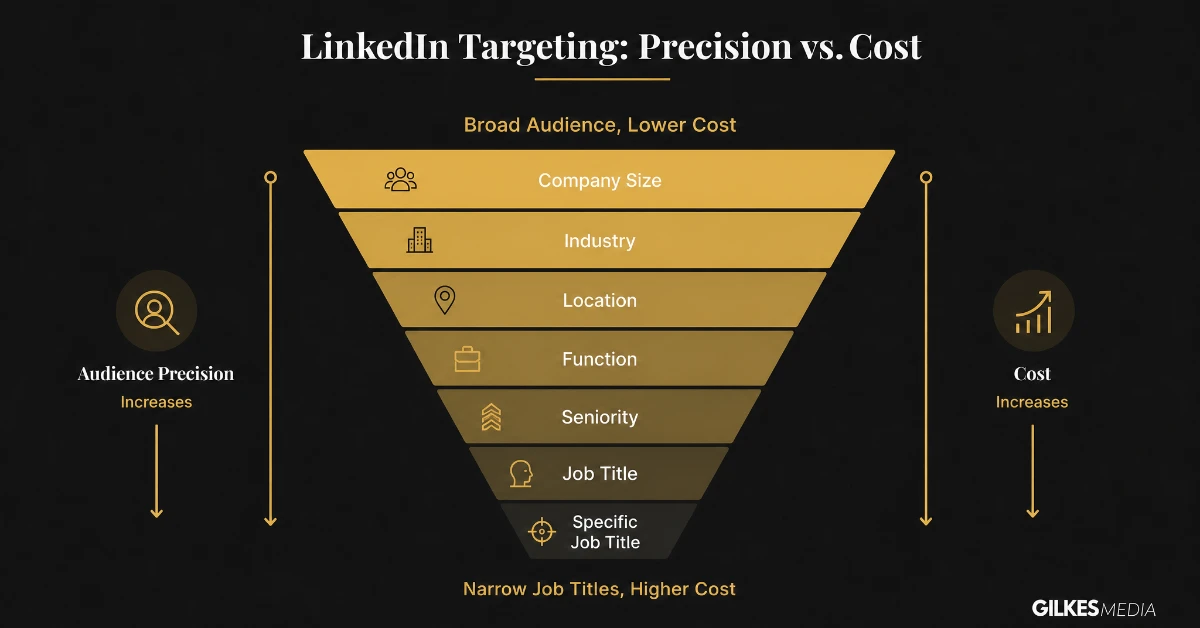
Every additional targeting layer, seniority, function, company size, skills, shrinks the pool and raises cost. Add layers only where they genuinely change who counts as a good-fit prospect, rather than stacking every available filter out of caution.
Retargeting website visitors or uploading a CRM contact list through Matched Audiences reaches a warmer, more receptive group than cold job-title targeting, typically at a lower cost per result because the audience already has some familiarity with the business.
LinkedIn’s auction rewards ads that get genuine engagement with a lower effective cost over time, the same underlying mechanic as Quality Score on Google. Creative that speaks directly to the specific audience segment, rather than a generic message aimed at everyone in that segment, earns better delivery at a lower price.
Native forms usually win on raw conversion rate and therefore lower cost per lead, but a landing page gives more room to pre-qualify and set expectations before someone submits. Running both against the same audience for a few weeks is the only reliable way to know which produces a better cost per qualified lead for a specific offer.
The budget bands earlier in this guide are sensible UK starting points, but turning them into a number specific to your business takes one more step.
LinkedIn’s premium pricing only makes sense against a high-value outcome. Work out the lifetime value of a typical customer reached through LinkedIn, and use that to set a maximum viable cost per lead before setting a media budget, rather than the other way round.
New accounts, and any account that has just changed targeting or format significantly, need time for LinkedIn’s algorithm to learn who engages. Four to six weeks at a consistent budget is a realistic minimum before judging whether a campaign is working.
LinkedIn audiences are smaller than Meta’s, so the same ad reaches the same people more often, and fatigues faster as a result. Budgeting for a new creative variant roughly every three to four weeks keeps performance from quietly declining as an unnoticed side effect of frequency rather than targeting or offer.
LinkedIn typically runs £5-15 per click depending on how narrow the targeting is, considerably higher than Meta or Google for the same audience size. Judge it against cost per qualified lead rather than cost per click alone, since LinkedIn’s precision usually produces a higher proportion of genuinely relevant leads.
You are paying for job-title and seniority precision that no other major platform can match. The premium reflects genuinely narrower, more valuable audience access, not inefficiency.
A modest testing budget usually starts around £1,000-2,000 a month, since LinkedIn needs more spend than Meta to gather a meaningful sample from a narrow professional audience.
For a genuinely relevant, personalised offer to a well-targeted audience, often yes. For a generic broadcast message, rarely, since response rates drop sharply once a message reads as mass-sent rather than personal.
Not inherently, but the ease of submitting means some leads are less considered. Pairing native forms with a proper qualification step after submission usually solves this without sacrificing the higher conversion rate.
Google captures people already searching for a solution; LinkedIn reaches people by professional identity, whether or not they are actively searching. Our guide on Google Ads cost in the UK covers that channel in full, and most serious B2B strategies use both rather than choosing one.
There isn't one correct LinkedIn Ads budget for every business, but there is a sensible way to arrive at one. Start with enough spend that the platform has a genuine chance to learn, and give a campaign a fair run before judging it.
Working out your genuine customer acquisition cost before you commit to a monthly figure gives you a much clearer sense of whether a given cost per lead actually makes sense for your business.
If you're weighing up whether LinkedIn Ads make sense for your business, that's exactly the kind of conversation worth having before you commit any spend. Our paid ads management service covers LinkedIn, Meta, Google and TikTok, and we'll always tell you honestly if a different channel is likely to work harder for your specific budget.
Get in touch through our contact page for a free discovery call, and we'll give you a straight, realistic view of what LinkedIn Ads would cost for your business.
The worked example is the point to hold onto: a rough first month settled into a lower cost per lead once the learning phase passed and the weakest ad set was cut. There's no universally correct LinkedIn budget, only a sensible way to arrive at one and the patience to let it settle.
B2B sales cycles reached through LinkedIn are often longer than the cycles a Meta or Google campaign feeds, sometimes considerably so for enterprise or considered purchases. Judging a LinkedIn campaign’s return on the same monthly cadence as a faster-converting channel routinely produces the wrong conclusion, because the leads it generates this month may not close for months.
A more honest approach tracks leading indicators, cost per lead, cost per opportunity, engagement rate, on a monthly basis, while reserving judgement on full return on ad spend for a timeframe that actually matches how long the sales cycle takes to close.
Below roughly £1,500-2,000 a month, the overhead of specialist management often outweighs what it adds, and a careful in-house approach, following the fundamentals in this guide, tends to make more sense. Above that, particularly once a campaign spans several formats or an account-based marketing structure, the complexity of managing targeting layers, bid strategy and creative refresh properly usually justifies specialist input.
A sensible middle path for a growing account is a one-off audit and initial setup from a specialist, handing management back in-house with an agreed quarterly review, rather than committing to full ongoing management before the account has proven it can sustain that spend profitably.
Of everything covered here, Matched Audiences is the most consistently underused feature. Businesses will spend heavily narrowing cold job-title targeting while never uploading their own CRM list or installing the Insight Tag to build a retargeting pool. Warm audiences reached this way routinely cost less per result than cold targeting of the same seniority and function, simply because the audience already knows the business.
It is also nearly free to set up: the Insight Tag is a one-time installation, and a CRM list export takes minutes. Businesses running LinkedIn without this in place are, in effect, paying premium cold-targeting prices for an audience that could be reached far more cheaply as a warm one.
Bring the pieces in this guide together, sensible budget bands, an honest read on the precision-cost trade-off, the right format for the objective, and a warm Matched Audience layer running alongside cold targeting, and LinkedIn stops looking like the expensive option by default and starts behaving like the precise, accountable channel it can genuinely be.
That is a more useful place to land than simply accepting a high cost per click as the price of doing business on LinkedIn. The premium is real, but so is the room to manage it properly, and most UK businesses paying LinkedIn’s top rates have not yet used every lever available to bring that number down without losing the precision they are paying for in the first place.
Every figure in this guide reflects genuine UK market ranges, not invented numbers, but a benchmark describes an average across many accounts with very different audiences, offers and customer values. Paying meaningfully above the ranges here is not automatically a sign of a poorly run account; it may simply reflect a narrower, more valuable audience than the typical account these figures represent.
The more useful question is not "are we paying the UK average" but "is our cost per result justified by what a converted lead is actually worth to us." Answering that honestly, using your own customer value and conversion data rather than someone else’s benchmark, is worth more than chasing a headline figure from an article, including this one.
Treat LinkedIn as a genuinely ongoing part of the marketing mix rather than a channel switched on for a quarter and abandoned at the first expensive month, and the precision it offers starts to show up reliably in the pipeline rather than just in the invoice.
That consistency, reviewing monthly, refreshing creative on a schedule, layering in Matched Audiences, is what separates UK businesses that get genuine, compounding value from LinkedIn over years from ones that keep relitigating whether the platform is worth it every time a campaign has a slow month.
Get the fundamentals right, a budget matched to genuine customer value, formats chosen for the objective, and a warm audience layer running alongside cold targeting, and LinkedIn becomes one of the more predictable, defensible lines in a B2B marketing budget rather than the one that is hardest to explain internally.
That defensibility, being able to explain clearly why the account costs what it costs and what it is genuinely producing in return, matters more for LinkedIn than almost any other paid channel, precisely because its premium pricing invites more scrutiny than a cheaper platform ever does.
Meet that scrutiny with the fundamentals in this guide rather than a defensive shrug about "that’s just what LinkedIn costs," and the conversation about whether to keep investing gets a great deal easier to have.
A useful monthly report separates cost per click, cost per lead, and cost per opportunity, rather than blending them into a single "performance" figure. It notes which targeting layers and formats were tested that month, what changed since the last review, and whether creative is due for refresh based on frequency data, not just a gut feeling that an ad "looks tired".
It also states plainly what timeframe a fair judgement needs, given the sales cycle the campaign feeds, rather than implying every month should look like a clean win. A report that does this consistently, month after month, is what actually builds the internal confidence to keep a LinkedIn budget in place through the inevitable slower months, rather than it becoming the first line item questioned whenever results dip.
Build reporting around that structure from the first month, and LinkedIn stops being the platform everyone quietly dreads justifying at the next budget review.