If your Google Ads cost per lead has crept up for no obvious reason, click fraud is worth ruling out. The same goes if a particular area keeps generating clicks that never turn into enquiries.
It is one of the quieter ways UK ad budgets get wasted. It does not look like a mistake, because the clicks are real and the spend is real.
The only sign something is wrong is a cost per lead that never quite adds up, month after month, with no clear explanation from your targeting or your offer.
This guide covers what click fraud is and how common it really is in the UK. It covers what Google's own protection does and does not catch, and the practical steps to spot and stop it.
Every figure here is drawn from published industry research, not a guess.
Click fraud is any click on your ad that does not come from a genuine potential customer. It still costs you money under a pay-per-click model.
It can never convert, because the person or system behind it was never going to buy anything in the first place.
It ranges from automated bot traffic crawling ad networks, to a competitor manually clicking your ads to drain your daily budget. It also includes low-quality websites stuffed with ads purely to generate accidental clicks.
Three groups drive most of it. Bot networks click ads automatically at scale, often to inflate traffic on ad-supported websites that get paid a share of your spend.
Direct competitors sometimes click rival ads deliberately. The aim is usually to exhaust a smaller competitor's daily budget before real customers ever see the ad.
Made-for-advertising websites exist purely to host as many ads as possible. They generate clicks with no intention of providing useful content to a real visitor.
Click fraud is not one thing. It is bots, competitors, and low-quality ad-stuffed websites, and each behaves differently enough that spotting them needs slightly different checks.
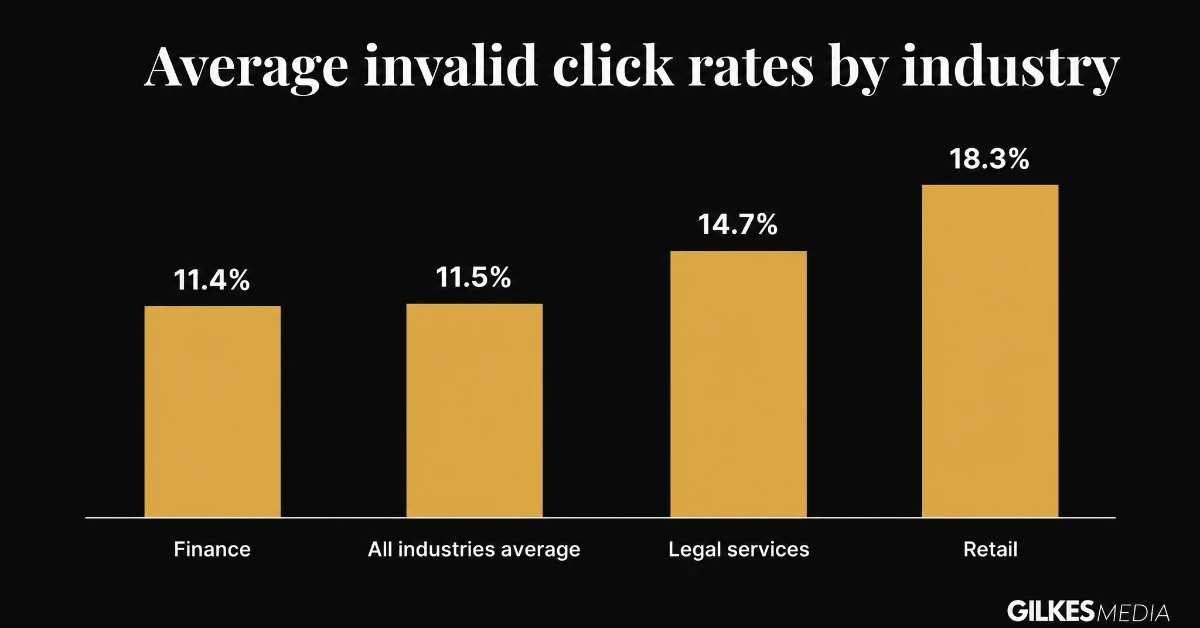
Independent research into Google Ads accounts puts the average invalid click rate at around 11.5% of all clicks. That means more than one in ten clicks a typical advertiser pays for was never a genuine potential customer.
The rate is not even across industries. Sectors with a high value per lead attract more fraud, since there is more to gain per fraudulent click.
| Industry | Average invalid click rate |
|---|---|
| Retail | 18.3% |
| Legal services | 14.7% |
| Finance | 11.4% |
| All industries (average) | 11.5% |
Google's own automated filters catch a large share of obvious invalid clicks before you are ever charged for them.
Independent research suggests around 5.8% of invalid clicks still slip through these filters and get billed. That residual figure is exactly why account-level monitoring still matters, even on a well-optimised campaign.
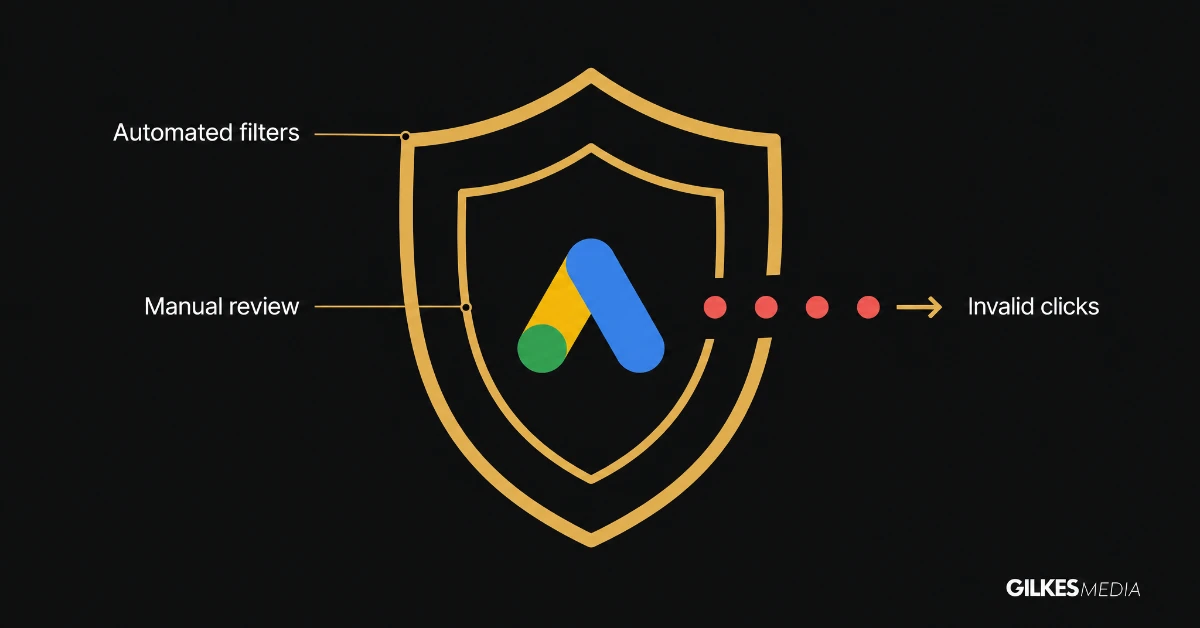
Google runs a genuine, two-layer defence. Automated systems analyse click patterns and behaviour in real time, backed by manual review for edge cases.
When invalid activity is confirmed after you have already been charged, Google issues an automatic billing credit.
These credits appear directly on your billing summary, usually without you needing to request anything. They cover clearly identifiable invalid activity.
That includes duplicate clicks from the same source in a short window, or clicks matching a known bot signature.
They do not cover every grey-area case. They will not retroactively fix a campaign that has been quietly bleeding budget to borderline traffic for months before anyone noticed.
The Display Network carries meaningfully more risk than standard Search campaigns. A portion of Display placements carry non-human traffic that is harder to filter automatically.
Sophisticated bots that mimic real browsing behaviour are also harder to catch than obvious scripted clicks.
Low-volume, manual competitor clicking rarely trips any automated threshold at all. In small numbers, it simply looks like ordinary human activity to an automated system.
Performance Max campaigns add a further wrinkle. They offer very limited manual controls, including IP-level exclusions, which makes hands-on protection harder to apply there than on a standard Search campaign.
Google's own filters are genuinely good at catching obvious bot traffic, but they are reactive by design. Slow-drip competitor clicks and sophisticated bots that mimic real browsing are exactly the cases that slip through.
A rising cost per lead has more than one possible cause, and it pays to rule out the others before assuming fraud. Treating every increase as fraud can send you chasing the wrong fix.
The same audience seeing the same ad repeatedly tends to click and convert less over time. This shows up as a gradual decline in click-through rate alongside a stable or improving conversion rate on the clicks you do get.
More advertisers bidding on the same keywords pushes up cost per click across the board. This shows up as a rising average cost per click industry-wide, not just for you, alongside a conversion rate that has stayed broadly normal.
Fraud tends to show a different signature: click volume or cost rising while conversion rate falls sharply, concentrated in specific locations, devices, or placements rather than spread evenly across your whole account.
If the drop is broad and gradual, look at fatigue or competition first. If it is sudden, patchy, and concentrated, fraud becomes the more likely explanation.
Device type is one of the clearer fraud signals available, because invalid click rates are not spread evenly between mobile and desktop traffic.
Independent ad-fraud monitoring firms such as Pixalate have reported mobile-app advertising carrying meaningfully higher invalid traffic than desktop-web traffic, with that gap widening through 2025 as automated mobile click activity increased.
That does not mean mobile traffic is inherently worse for every advertiser. It means the device split in your own account is worth checking specifically, rather than assumed to be even.
Pull the device performance report alongside your existing geographic and placement checks. Look for a device type that spends disproportionately more than it converts.
Where a genuine gap shows up, a negative bid adjustment on the weaker device is a lighter-touch fix than excluding it outright. It reduces exposure without cutting off real customers on that device.
Treat any single month's device split as one data point, not a verdict. Device performance shifts seasonally, so confirm a pattern over at least two reporting periods before adjusting bids.
Device type is not proof of fraud on its own, but it is one of the cheapest checks available, and worth running alongside the geographic and placement checks already in your monthly routine.
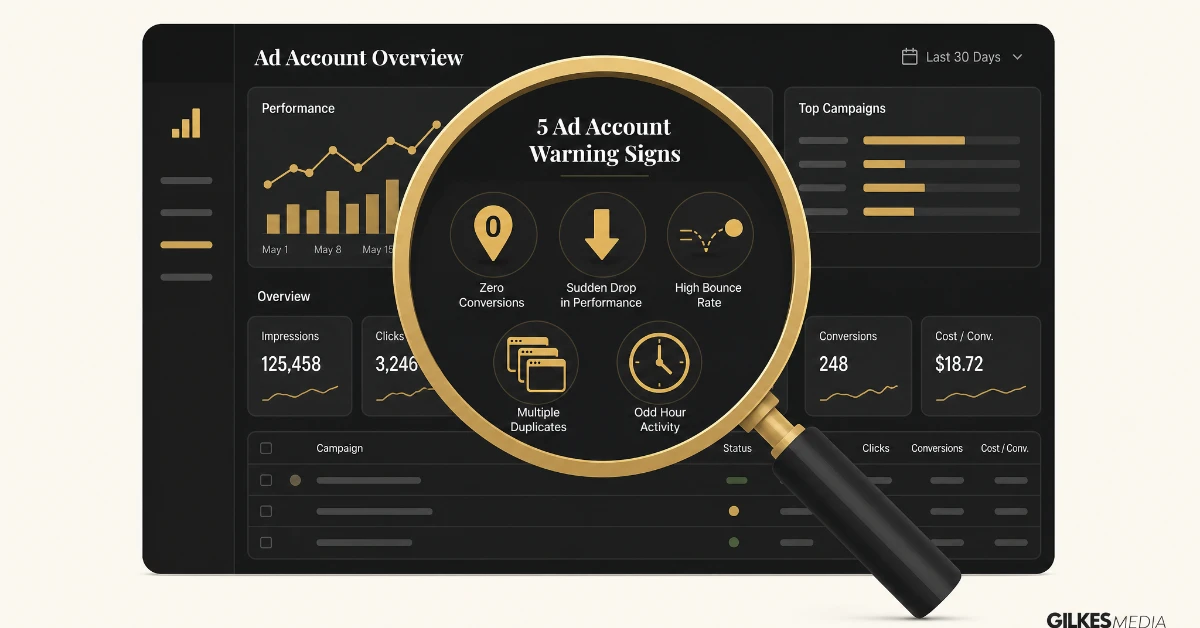
You do not need specialist software to catch the obvious cases. A handful of warning signs, checked regularly, will flag most of what matters.
Run this check monthly rather than only when something already feels wrong. Fraud is far cheaper to catch early than to unwind after months of wasted spend.
A single audit tells you about the past. Genuine protection comes from checking regularly, since fraud patterns shift as bot networks and competitors change tactics.
Add the geographic, placement, and device checks to whatever reporting routine you already run for bidding and budget. It takes a few minutes once the habit is formed.
Note every IP address or placement you exclude, and why. This stops you from repeating the same investigation later, and makes it easy to reverse a decision if it turns out to have been too aggressive.
An IP address or placement excluded a year ago may no longer be a problem, or may belong to an internet connection that has since changed hands. Stale exclusions can quietly cost you real customers over time.
Once you have identified a genuine pattern, the fix is usually straightforward, though it needs a light touch. Overcorrecting can quietly exclude real customers along with the fraudulent traffic.
Add confirmed problem IP addresses to your exclusion list at campaign or account level. Exclude specific placements on Display and YouTube campaigns once you have confirmed they are generating low-quality clicks rather than genuine engagement.
Narrow your targeted locations to your genuine service area, rather than leaving broad regional or national targeting switched on by default.
Consider dayparting to reduce exposure during hours when your real customers are never searching but bots are still active.
A tightly built negative keyword list reduces the pool of loosely-matched searches your ads show against in the first place, which also reduces the surface area available to low-quality clicks.
Refining audience signals and demographic targeting has a similar effect, narrowing who your ads are even eligible to be shown to.
Dedicated click fraud protection tools monitor traffic in real time. They can automatically exclude confirmed bad actors faster than a manual monthly review.
They come at an extra monthly cost on top of your ad spend, so they earn their keep mainly on larger accounts where even a few percentage points of fraud represents real money.
| Approach | Best suited to | Trade-off |
|---|---|---|
| Manual monthly review | Smaller accounts, tighter budgets | Free, but reacts slower and depends on someone actually doing it |
| Third-party protection software | Larger accounts, high-value leads | Real-time blocking, but adds a recurring cost |
Fix the confirmed problems first: exclude the IP addresses and placements you can prove are bad. Only add paid third-party protection once manual review shows the scale of the problem justifies it.
Take a UK business spending £2,000 a month on Google Ads, sitting at the industry-average 11.5% invalid click rate. That works out to roughly £230 wasted every month, or around £2,760 across a year.
For a legal services firm at the higher 14.7% rate, the same £2,000 monthly budget loses closer to £294 a month, or about £3,528 a year, to clicks that were never going to become clients.
Neither figure will bankrupt a business on its own. But it is a real, recoverable amount sitting inside a budget that is often already tightly stretched.
It compounds every month it goes unchecked, which is exactly why a monthly review habit matters more than a single one-off clean-up.
For a small account spending a few hundred pounds a month, a monthly manual review using the steps above is usually enough. An extra software subscription may cost more than the fraud itself.
For a larger account, particularly one running Display or YouTube alongside Search, or operating in a higher-fraud sector like legal or finance, real-time third-party protection often pays for itself quickly.
The simplest test: estimate your likely fraud loss using your own spend and your industry's typical rate, and compare that figure honestly against a tool's monthly cost before committing.
Most work by monitoring clicks in real time, scoring each one against known fraud signatures, then automatically pushing confirmed bad IP addresses into your Google Ads exclusion lists without you doing it by hand.
The better ones also cover Meta and Microsoft Ads from one dashboard, rather than needing a separate manual process for every platform you advertise on.
Smaller, tightly-set daily budgets are more exposed proportionally, since a single bad afternoon of competitor clicking can burn through an entire day's spend before real customers ever see the ad.
Narrow geographic targeting, already sensible for a local business, also happens to be one of the better natural defences against fraud from outside your genuine area.
A single fraudulent click matters less in isolation when average deal sizes are large, but the fraud rate itself tends to be higher in exactly these higher-value sectors.
Legal and financial services sit among the higher-fraud categories precisely because a genuine lead is worth so much more to whoever is trying to drain the budget.
Retail showed the highest average invalid click rate of the sectors in the earlier table, at 18.3%. High click volumes make individual fraudulent clicks easy to lose inside the noise of normal traffic.
Made-for-advertising sites and Display placements are a particular risk here, since retail campaigns lean more heavily on Display and Shopping formats than most other sectors.
A retailer with thin margins per sale can afford this less than the raw percentage suggests, since fraud eats directly into an already tight per-order profit line.
Click fraud sits in a legal grey area that is more complicated than most advertisers assume. Criminal prosecution is rare even where the law clearly applies.
Two pieces of UK legislation are potentially relevant. The Computer Misuse Act 1990 covers unauthorised access to or interference with a computer system, which can apply to automated bot-driven clicking.
The Fraud Act 2006 covers fraud by false representation. In principle, that could apply to a competitor deliberately posing as a genuine customer to drain a rival's ad budget.
Neither law was written with pay-per-click advertising in mind, and neither has a well-established track record of UK prosecutions specifically for click fraud.
The practical barrier is not the law itself, it is evidence. Proving a specific click came from a named individual acting with fraudulent intent, rather than an anonymous IP address, is genuinely difficult.
This is why the realistic goal for most businesses is stopping the financial bleed through account-level exclusions, rather than pursuing a legal case that is unlikely to go anywhere.
Reporting suspected invalid activity directly to Google, with dates, IP addresses and screenshots of the pattern, is the step most likely to produce a useful outcome such as a billing credit.
UK businesses wanting a formal record on file can also report to Action Fraud, the national reporting centre for fraud and cybercrime run by the City of London Police, at actionfraud.police.uk.
Keep your own audit log regardless of whether you report externally. It is what turns a vague suspicion into a case Google, or anyone else, can actually act on.
The law is on your side in principle. In practice, a clean audit trail and a direct report to Google will do more for your budget than a legal claim that is hard to prove and slow to resolve.
A few terms come up repeatedly in fraud dashboards and industry research. Knowing what they actually mean makes any report, whether Google's own or a third-party tool's, easier to act on.
None of these terms require memorising in full. Recognising them when they appear in a Google support reply or a software dashboard is enough to understand what is actually being reported.
Click fraud monitoring is the kind of ongoing account hygiene that gets skipped when nobody owns it full time. It rarely causes a dramatic failure, so it is easy for a busy in-house team to let it slide.
Part of properly managing a PPC account is building this kind of check into a regular reporting cycle, alongside the more visible work of bidding, targeting, and ad copy.
If your cost per lead has been drifting upward and you cannot pin down why, a fraud audit is a cheap, fast thing to rule in or out before assuming the channel itself has stopped working.
It is also worth checking against a wider view of your account health, the kind covered in our guide to Google Ads for small business, since fraud is rarely the only thing worth reviewing.
A free consultation is the easiest way to get a second pair of eyes on your account and find out whether this is quietly costing you money.
Click fraud is any click on a pay-per-click ad that does not come from a genuine potential customer, including bot traffic, manual competitor clicks, and clicks generated by low-quality ad-stuffed websites. It costs money but can never convert.
Independent research puts the average invalid click rate across Google Ads accounts at around 11.5%, with higher rates in sectors like retail (18.3%) and legal services (14.7%), where the value per lead is higher.
Yes, Google automatically issues Invalid Activity Credits when its systems confirm invalid clicks after you have been charged. However, independent research suggests roughly 5.8% of invalid clicks still slip through undetected.
Yes, for smaller accounts a monthly manual review of geographic, placement, and device reports usually catches the clearest cases. IP and placement exclusions can then be applied directly inside Google Ads at no extra cost.
Generally yes. The Display Network carries more risk because a portion of placements receive non-human traffic that is harder for automated filters to catch, particularly on low-quality, ad-stuffed websites.
Performance Max offers very limited manual controls, including IP-level exclusions, which makes hands-on fraud protection harder to apply compared with a standard Search campaign.
It tends to pay for itself on larger accounts, accounts running Display or YouTube alongside Search, or businesses in higher-fraud sectors such as legal or finance, where even a few percentage points of fraud represents meaningful money.
Yes. Increased competition and ad fatigue can both raise cost per lead too. Fraud tends to show a patchier signature, concentrated in specific locations, devices or placements, rather than a broad, gradual rise across the whole account.
Monthly is a sensible baseline for most accounts, folded into whatever reporting routine you already run for bidding and budget. Larger or higher-fraud-risk accounts benefit from checking more often, or from real-time third-party monitoring.
Potentially, under the Computer Misuse Act 1990 and the Fraud Act 2006. Prosecutions specifically for click fraud are rare, since proving a specific click came from a named individual with fraudulent intent is genuinely difficult. Most businesses focus on account-level fixes instead.
It can. Industry monitoring data has reported higher invalid traffic rates on mobile advertising than on desktop in recent years. It is worth checking your own account's device report rather than assuming the split is even.
If you would rather not run these checks yourself every month, we build click fraud monitoring into the Google Ads accounts we manage for UK businesses as standard. Get in touch for a free consultation and we will take it off your plate.