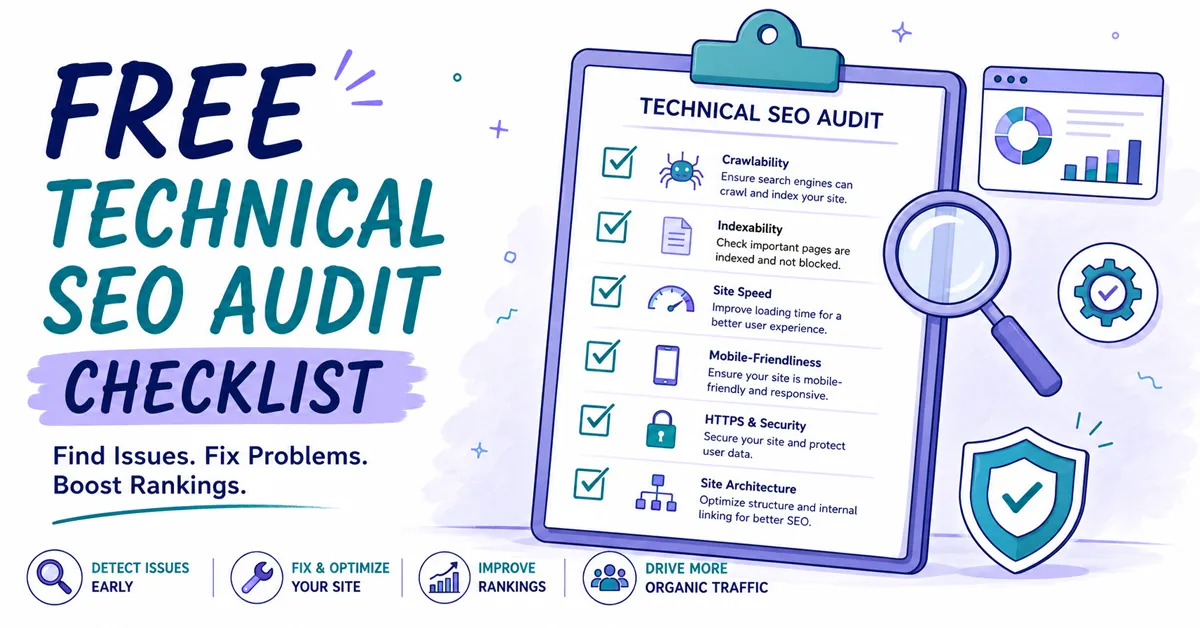
Many UK businesses do the visible parts of SEO first. They brief content, chase keywords, tweak service-page copy, then wonder why rankings stall and enquiries stay flat. The problem often sits underneath the marketing, not inside it. A bloated template, a bad redirect rule, blocked resources, or a mobile layout that breaks under pressure can stop a strong SEO strategy from producing commercial results.
That matters more now because UK browsing behaviour is firmly mobile-led. Ofcom reported that mobile devices were used for a majority of internet access for the first time in 2014, and by 2023 around 97% of UK adults were online, with smartphone ownership at 88% and mobile data use central to everyday browsing, which is why mobile usability has to sit near the top of any serious audit process for UK businesses. If your site is awkward on a phone, you're not just annoying visitors. You're undermining visibility and lead generation at the same time.
A proper technical SEO audit checklist isn't a box-ticking exercise. It should help you decide what to fix first, what can wait, and what will move enquiries rather than just make a report look thorough. That's the lens we use at Gilkes Media. Commercial impact first, technical neatness second.
Below is a prioritised 10-point plan built for UK service firms, B2B businesses, and SMEs that want technical SEO to support revenue, not just rankings.
Speed problems rarely affect one page. They usually affect an entire template, which is why this is often one of the most valuable fixes in a technical audit.
For UK lead generation sites, mobile performance deserves the first look. Google's guidance still uses Core Web Vitals as a ranking and UX signal, and UK-focused performance reporting shows mobile experiences often fail on Largest Contentful Paint and Interaction to Next Paint because of heavy scripts, oversized images, and render-blocking CSS. In practice, a useful audit should target sub-2.5s LCP, low CLS, and minimal JavaScript execution on mobile, then validate improvements with CrUX or PageSpeed Insights where possible
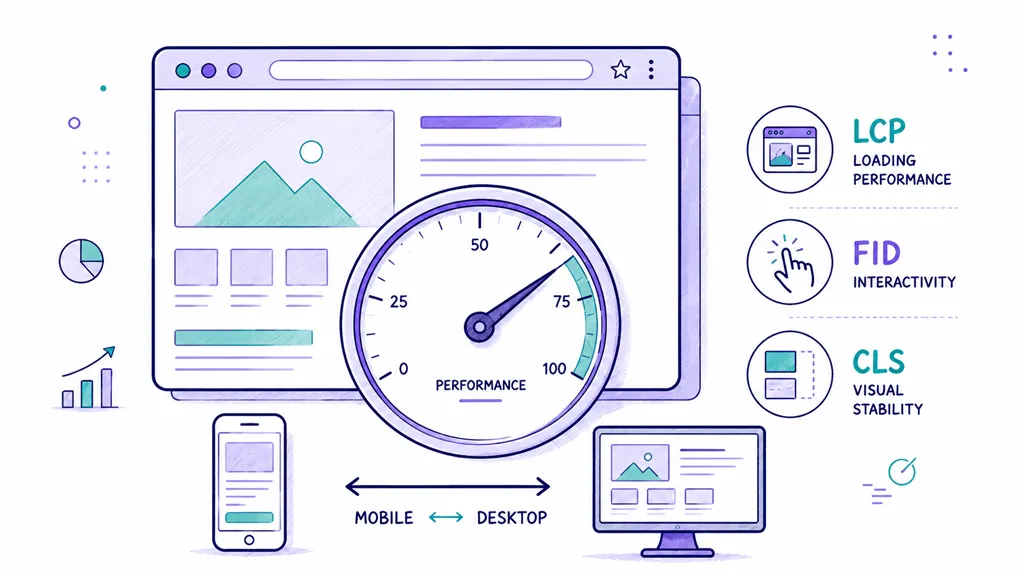
Slow sites don't just rank worse. They make buyers hesitate. A managing director lands on your page from search, the hero image drags in, the layout jumps, the form script hangs, and trust drops before they've read a line.
The biggest offenders are familiar:
If you're rebuilding or improving an SEO-focused site, Gilkes Media's SEO website development approach is designed to solve this at build level rather than paper over it with plugins.
Practical rule: Fix the template before you fix individual pages. A homepage hero problem usually exists on service pages, blog templates, and landing pages too.
For WordPress sites in particular, it also helps to review practical ways to optimise WordPress performance before adding more functionality.
A good place to start is with PageSpeed Insights, Chrome DevTools, and Search Console. Identify the LCP element, reduce JavaScript that delays rendering, compress large media, and defer anything non-essential. Most businesses get better results from simplifying the front end than from chasing exotic performance tweaks.
If you're weighing up paid platforms alongside the free basics above, our roundup of the best SEO tools for small business breaks down where tools like Semrush and Ahrefs earn their keep, and where a free tool does the job just as well.
A short walkthrough can help your team understand the key issues before development starts:
An XML sitemap won't rescue a poor site structure, but it does make crawling cleaner and indexation more predictable. That's especially useful on service websites with lots of sector pages, location pages, articles, and downloadable resources.
I often find businesses assume their sitemap is fine because a plugin generated one years ago. Then you inspect it and discover redirected URLs, noindex pages, thin archives, or pages that shouldn't be anywhere near Google. That creates noise, not clarity.
A useful sitemap should contain only canonical, indexable URLs that you want to rank. For a UK B2B firm, that usually means service pages, sector pages, core location pages, key articles, and selected conversion pages.
Check these points carefully:
A common real-world example is a professional services site with fifty useful landing pages but a sitemap stuffed with author archives, media attachment pages, and old blog category URLs. Google can work around some of that, but it slows down understanding of what's commercially important.
A sitemap should reinforce your strategy, not expose your CMS clutter.
Tools like Yoast SEO, Rank Math, Screaming Frog, or your CMS can generate the file, but generation isn't the same as validation. Open the sitemap manually. Crawl the listed URLs. Compare them against what you want indexed. If your sitemap feels like a technical afterthought, Google will treat it that way too.
Many otherwise decent sites experience issues here. They may appear polished on a laptop in a boardroom, yet become frustrating on a phone in everyday use.
For UK SMEs, mobile-first isn't theoretical. Google now uses mobile-first indexing by default, and because the UK audience is heavily mobile-led, your audit should treat responsive layouts, tap-target spacing, viewport configuration, and mobile crawlability as foundational checks, not optional extras. If your mobile version strips content, hides key trust signals, or breaks form usability, both rankings and conversions suffer.
Desktop previews aren't enough. Test on actual phones and tablets.
Look for:
One common issue on B2B websites is a neat desktop mega-menu collapsing into an unusable mobile drawer with hidden service links. Another is cutting long-form content on mobile to make the page feel shorter, which often removes the very relevance signals Google needs.
If a buyer can't read, tap, scroll, and enquire comfortably on a phone, your mobile SEO isn't compliant in any meaningful sense.
Use Google's mobile-friendly testing tools, Search Console URL inspection, and manual checks across common devices. Responsive design is usually the safest route. Separate mobile URLs create extra technical overhead and more places for things to go wrong.
This check can uncover the most expensive mistakes in the shortest time. One incorrect directive can make critical pages invisible.
Robots.txt and meta robots do different jobs. Robots.txt manages crawl access. Meta robots manages indexation at page level. Confusing the two is still common, especially after redesigns, migrations, or rushed developer deployments.
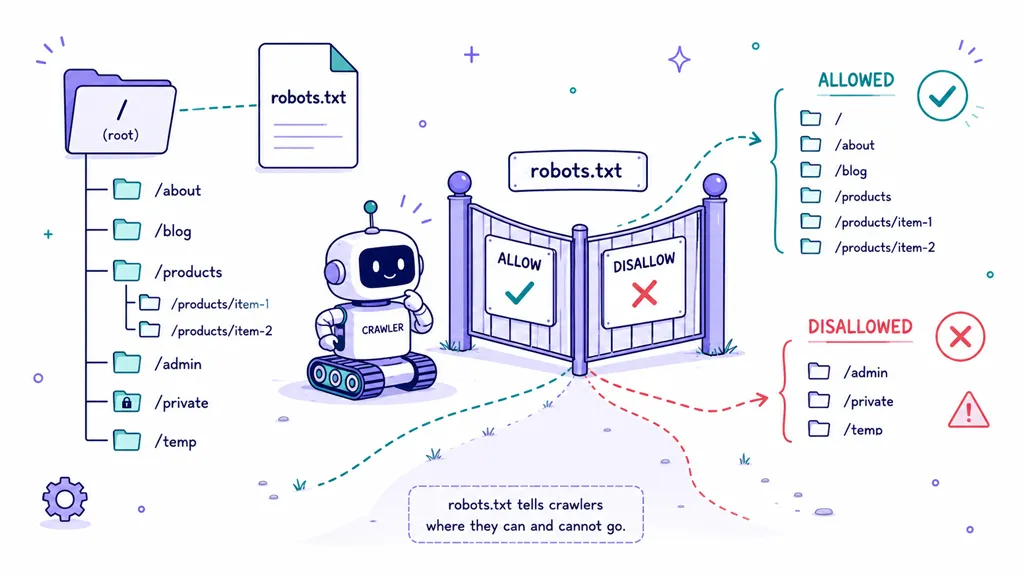
Open your robots.txt file in a browser and inspect it line by line. Then crawl the site with the rules applied.
Pay particular attention to:
A classic scenario is a lead generation site where PPC landing pages were intentionally noindexed, then developers reused the same template for organic service pages without changing the directive. Rankings don't grow, and nobody notices until months later.
Google's own guidance notes that JavaScript rendering can delay or complicate indexing, and audits that only inspect source HTML can miss content hidden behind client-side rendering. For script-heavy SME sites, the question isn't whether you have a sitemap. It's whether Google can reliably see the same critical content a user sees quickly enough to matter.
Use Search Console, Screaming Frog, and manual spot checks. Don't just confirm that robots.txt exists. Confirm it's helping, not harming.
Canonical tags are one of those technical elements that look tidy in theory and get messy fast in practice.
On many SME websites, duplicate content doesn't come from deliberate SEO manipulation. It comes from CMS behaviour, filtering, print versions, tracking parameters, duplicated service URLs, or inconsistent trailing slash rules. Canonicals tell Google which version is the one that matters.
The most common problems I see are not missing canonicals. They're bad canonicals.
That includes:
A service business might have the same page available at a non-www version, a www version, with and without a trailing slash, and under both HTTP and HTTPS. If canonical signals are inconsistent, Google has to guess. That's not where you want ambiguity.
Duplicate signals dilute authority and muddle reporting. You start seeing the wrong page ranking, or no page ranking consistently, even though the content itself is fine.
A good rule is simple. Use self-referential canonicals on indexable pages by default, and only consolidate intentionally similar pages when there's a clear preferred version. Then check that the canonical destination returns a clean 200 status and matches your preferred domain structure exactly.
Canonical tags don't fix weak content, but they do stop technically unnecessary duplication from wasting authority.
Screaming Frog is excellent for catching canonical mismatches across a whole site. If a business has gone through redesigns, platform changes, or multiple agencies, this check nearly always uncovers something worth fixing.
Security is part of technical SEO now, not a separate IT concern. Buyers notice it, browsers notice it, and search engines notice it.
Google announced HTTPS as a ranking signal in 2014, and by 2018 Chrome started marking non-HTTPS pages as “Not secure”, which pushed security checks into the core of modern technical audits. For UK businesses, secure processing also intersects with wider data protection expectations, so audits now routinely need to validate SSL certificates, HTTP to HTTPS redirects, and canonical consistency across secure URLs.
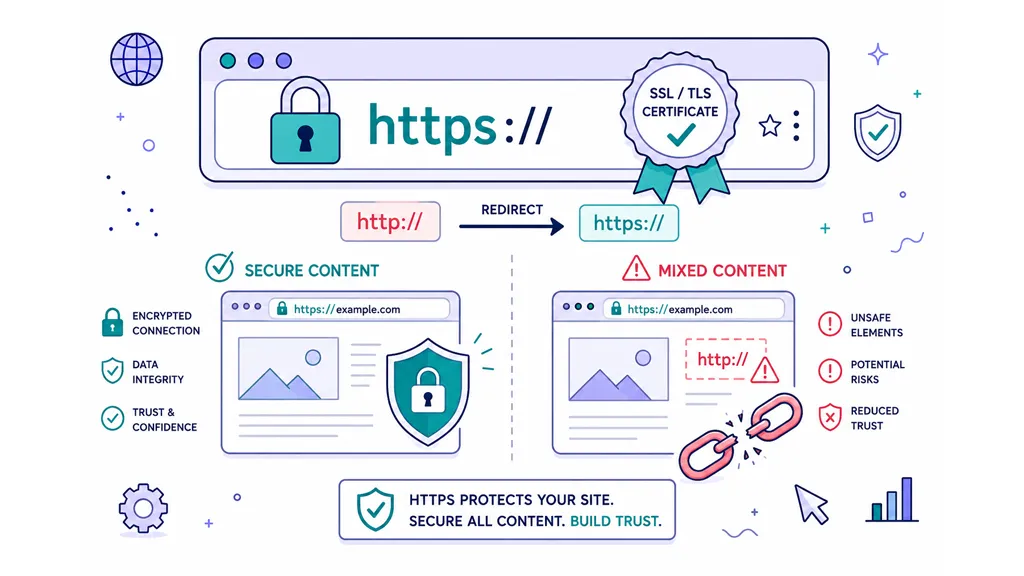
A page may load over HTTPS and still pull insecure assets such as old images, scripts, or fonts over HTTP. That creates mixed content warnings, weakens trust, and can break page functionality.
Check for:
This matters even more on enquiry pages. If someone reaches a quote form and sees browser warnings or broken assets, the path to conversion becomes fragile.
I treat security fixes as high priority because they affect SEO, user trust, and lead quality together. If a business is asking prospects to submit personal details, HTTPS isn't a nice-to-have. It is the minimum standard.
Structured data helps search engines understand what your pages are, not just what they say. On service and B2B sites, that can improve eligibility for richer search presentation and clearer brand interpretation.
The mistake is thinking schema is magic. It isn't. Adding markup to a weak page won't force visibility. But on a technically sound page with clear intent, it can support stronger search appearance and cleaner interpretation of your content.
Most UK SMEs don't need every schema type under the sun. They need the right ones implemented properly.
Start with the essentials:
A law firm with office locations, named practice areas, and clear contact details can benefit from cleaner entity signals. A B2B software company can use organisation-level schema and breadcrumbs to improve clarity around brand and site hierarchy.
Schema should match what users can see on the page. If it doesn't, it becomes noise or risk.
Test it with Google's Rich Results Test and a schema validator. Then review Search Console for errors. It only takes one malformed property across a template to replicate the issue across dozens of pages.
Clean schema won't rescue a poor site. But when the rest of the technical foundation is solid, it can improve how confidently search engines interpret your pages.
Some technical fixes are invisible to the average visitor but decisive for SEO. Crawlability is one of them.
A site can look excellent on the front end and still be hard for search engines to process. Important pages get buried, orphaned, over-clicked, or diluted by messy architecture. The result is simple. Google spends time on the wrong URLs and not enough on the pages you intend to rank.
The common problems are familiar across service businesses:
For UK service firms, architecture should mirror how buyers think. Core services first. Supporting sectors or locations underneath where relevant. Blog content should support commercial pages, not sit in a silo disconnected from them.
Google Search Central has stated that page experience is a ranking signal, and Ofcom reported that 98% of UK premises had access to gigabit-capable broadband in 2024, which means persistent slowness and crawl inefficiency are increasingly site problems rather than network excuses.
If you're building your audit toolkit, Gilkes Media's guide to the best free SEO tools is a practical starting point for crawling, diagnostics, and ongoing checks.
Don't ask only, "Can Google reach this page?" Ask, "Does the site make it obvious that this page matters?"
The strongest site structures make priority pages easy to find for both users and crawlers.
Screaming Frog is usually the fastest way to expose the pattern. Crawl the site, map click depth, identify orphan pages, and inspect internal linking to revenue-driving URLs. In many cases, architecture changes improve SEO faster than producing another round of content.
Redirect problems are one of the most common forms of hidden technical drag. The site still works, pages still load, and no one notices that every important URL takes an unnecessarily long route.
Status codes tell browsers and crawlers what happened when they requested a page. In commercial terms, this is about efficiency and trust. A clean 200 page is straightforward. A single 301 is usually fine. Chains, loops, soft 404s, and server errors are where SEO performance starts leaking.
Review the full set of status codes across the site and look for patterns, not isolated incidents.
Focus on:
A common business scenario is a site that has gone through a redesign, then a HTTPS migration, then a service-page restructure. On paper, every old URL redirects somewhere. In reality, many important pages pass through multiple hops before reaching the final destination.
What works is boring but effective. Keep redirect maps current, collapse chains, and update internal links at source.
What doesn't work is treating redirects as permanent duct tape. Left alone, they create crawl inefficiency, slower journeys, and muddier technical signals over time.
Use Screaming Frog and Search Console to identify where these issues sit. Then prioritise by commercial importance. If a dead resource page has a problem, that's one thing. If your core service pages and enquiry routes do, fix them first.
This is the least technical item in the list, but it still belongs in a technical SEO audit checklist because poor metadata wastes visibility you've already earned.
You can rank reasonably well and still lose clicks if titles are vague, duplicated, truncated, or disconnected from intent. On service and B2B sites, that's expensive. You're not trying to attract casual traffic. You're trying to earn visits from people ready to compare providers and enquire.
Businesses often rely on default CMS output, which creates generic titles, recycled descriptions, and weak heading structures.
Look for:
A good title isn't just keyword placement. It frames relevance. A good meta description isn't a ranking factor in the classic sense, but it does influence whether a searcher chooses you over a competitor.
If you're reviewing broader page-level SEO alongside metadata, Gilkes Media's guide to best website SEO is a useful companion piece.
For the full picture beyond metadata — keyword placement, heading structure, and internal linking — see our on-page SEO best practices guide.
A title tag should reflect the searcher's likely intent. A description should reinforce trust, relevance, and next-step value.
Don't write metadata for an SEO tool score. Write it for the person choosing whether your result looks worth their time.
For service businesses, that often means clearer commercial language, stronger local relevance where appropriate, and headings that match what the page is truly about. Metadata tweaks won't fix a broken site, but they do improve the return from the visibility your technical work helps gain.
Running this technical SEO audit checklist gives you clarity. It shows where the site is underperforming, where Google may be getting mixed signals, and where buyers are meeting avoidable friction. That's useful, but it isn't the end point. The audit only creates value when someone turns the findings into a plan and gets the fixes implemented properly.
Many businesses often get stuck at this stage. They have a crawl report, a PageSpeed screenshot, a list of errors from Search Console, and no real sense of order. Everything looks urgent. In reality, it isn't. Some issues are hygiene tasks. Some are genuine blockers. Some are worth fixing only if they affect key templates, high-intent landing pages, or revenue-driving user journeys.
The right next step is prioritisation. Fix the issues that stop pages being crawled, indexed, rendered, trusted, or used on mobile. Then move into the improvements that sharpen click-through rate, strengthen site architecture, and reinforce commercial relevance. That's the difference between technical SEO as maintenance and technical SEO as a growth tool.
At Gilkes Media, that's how we approach it. We don't hand over a giant spreadsheet and leave clients to decode it. We translate technical findings into a roadmap tied to commercial outcomes. If a performance issue affects every service template, that climbs the list. If a canonical problem is diluting core landing pages, it gets addressed before minor blog tidy-up work. If mobile usability is hurting form completions, that becomes both an SEO and CRO priority.
For businesses that need implementation support, Gilkes Media's Website Design and Development service helps resolve the problems that often sit behind weak SEO performance. That can mean improving page speed at template level, cleaning up messy redirects, fixing mobile UX, restructuring navigation, or building SEO-friendly pages that are easier to rank and easier to convert. A lot of technical SEO problems aren't really SEO problems at all. They're web build problems that show up in search performance.
It also connects directly to paid media. A technically weak site doesn't just underperform in organic search. It wastes paid traffic too. If your landing pages are slow, unstable, or difficult on mobile, your Google Ads and paid social campaigns won't deliver the ROI they should. That's why Gilkes Media positions SEO, web development, and paid acquisition together. Better technical foundations improve the efficiency of every traffic channel.
If you've worked through this list and recognised issues on your own site, the next move is simple. Turn the audit into a sequence of actions with owners, timescales, and clear commercial priorities. If you need senior support to do that, Gilkes Media can help with SEO consultancy, technical prioritisation, website improvements, and paid acquisition strategy that all point in the same direction.
A sound technical foundation won't replace good positioning, strong messaging, or a proper lead generation strategy. But without it, every other part of your marketing has to work harder than it should. Get the technical layer right, and the rest of your growth activity has a much better chance of converting visibility into enquiries.
Meta title suggestion: Technical SEO Audit Checklist for UK Businesses | Gilkes Media
Meta description suggestion: Use this practical technical SEO audit checklist to find and fix the issues hurting rankings, mobile UX, and enquiries for your UK business.
Suggested internal linking opportunities
If you want an expert second opinion on your site's technical health, Gilkes Media can help you turn audit findings into a focused growth plan. Whether you need SEO consultancy, hands-on implementation, a higher-performing website, or paid campaigns that convert better after the technical issues are fixed, the goal is the same. More qualified enquiries and stronger ROI without the fluff.